Many websites have several URLs with identical or very similar content. For users, this is often not a problem. For search engines, it is.
Example:
https://example.ch/product
https://example.ch/product/
https://example.ch/product?utm_source=newsletter
https://www.example.ch/product
For people, this is probably the same product page. For Google, these can be several different URLs. If it is not clear which version is the main version, Google has to decide for itself.
This is exactly where the helps.
The RankScan insight “Missing canonical tag” indicates that no canonical tag was found on a page. This is especially relevant for pages, shops, URL parameters, filter pages, product variants and websites with multiple URL versions.
The important point is context:
A missing canonical tag is not automatically an acute problem. But it can lead to loss of control when the same content is accessible under several URLs.
In this article, you will learn what a canonical tag is, when you need one, how to set it correctly and which mistakes to avoid.
- The canonical tag shows search engines the preferred URL of a page.
- Technically, it is output as rel="canonical" in the <head>.
- Google treats canonicals as a strong signal, not as an absolute command.
- Canonicals help consolidate signals for duplicate or similar URLs.
- For important indexable pages, a self-referencing canonical is a useful best practice; the topic becomes critical mainly with duplicates, parameters, variants or multiple URL versions.
- Canonicals should be output as absolute URLs.
- Canonical, , , and should be consistent.
- Canonical is not the same as a , or .
- Incorrect canonicals can push important pages out of the visible search index.
- RankScan helps identify missing, contradictory or risky .
What Is a Canonical Tag? #
A canonical tag is a link element in , the markup language for web pages, placed in the <head> of a page. It tells search engines which URL should be considered the preferred version of a piece of content.
Example:
<link rel="canonical" href="https://example.ch/product/" />In plain terms, this means:
This URL is the canonical main version of this content.
Google describes canonicalization as the process of selecting a representative URL from a group of duplicate or very similar pages. This URL is the canonical URL.
Source: Google Search Central – What is URL canonicalization?
What Does “Missing Canonical Tag” Mean? #
The RankScan insight “Missing canonical tag” means that no canonical tag was found on a page.
This can be harmless if:
- the page is clearly accessible under only one URL,
- no parameter or variant URLs exist,
- the page should not be indexed,
- it is an unimportant technical URL.
But it can be problematic if:
- the same page is accessible through several URLs,
- parameter URLs are indexable,
- filter pages create very similar content,
- product variants have their own URLs,
- /https or www/non-www are not unified cleanly,
- the sitemap contains different URLs than the ones linked internally,
- Google selects a different canonical URL than intended.
For RankScan, “Missing canonical tag” is therefore a high-priority hint that should always be evaluated in context.
Why Is the Canonical Tag Important for SEO? #
The canonical tag helps send clear signals to search engines.
1. Define the Preferred Main URL #
When content is accessible under several URLs, you can use the canonical tag to specify which URL should be preferred.
Example:
https://example.ch/shoes
https://example.ch/shoes?sort=price
The sorting URL can canonicalize to the main category:
<link rel="canonical" href="https://example.ch/shoes" />2. Consolidate Signals #
Google explains that canonical signals can help consolidate signals for duplicate URLs. These include, for example, links or other signals that would otherwise be distributed across different URL variants.
Source: Google Search Central – Consolidate duplicate URLs
3. Avoid the Wrong URLs in Search Results #
Without clear canonical signals, Google may select a parameter, tracking or variant URL as canonical.
This can lead to unattractive or unsuitable search results.
4. Make Crawling and Indexing More Efficient #
Canonical tags do not solve a problem on their own. But they help search engines better classify similar URLs and recognize the preferred version.
Canonical Is a Hint, Not an Absolute Command #
An important point: for Google, the canonical tag is a signal, not a guaranteed command.
Google can ignore your canonical declaration if other signals contradict it.
Examples:
- The canonical points to a 404 page.
- The canonical points to a noindex page.
- The target page is not similar in content.
- Internal links mainly point to another URL.
- The sitemap contains another URL.
- hreflang points to non-canonical URLs.
- several canonicals contradict each other.
- Redirects point to another version.
Google therefore recommends keeping canonical signals consistent and avoiding contradictory methods.
Source: Google Search Central – Consolidate duplicate URLs
Self-Referencing Canonical: Why It Makes Sense #
A self-referencing canonical points to the current URL.
Example on:
https://example.ch/seo-consulting/Canonical:
<link rel="canonical" href="https://example.ch/seo-consulting/" />At first glance, this seems unnecessary, but it is useful.
Benefits:
- The page names itself as the preferred version.
- Parameter variants receive a clear target.
- Scraping or copying cases can be classified more easily.
- The logic of the and templates stays more consistent.
- Audits become easier.
For important indexable pages, a self-referencing canonical is therefore best practice.
When You Need a Canonical Tag #
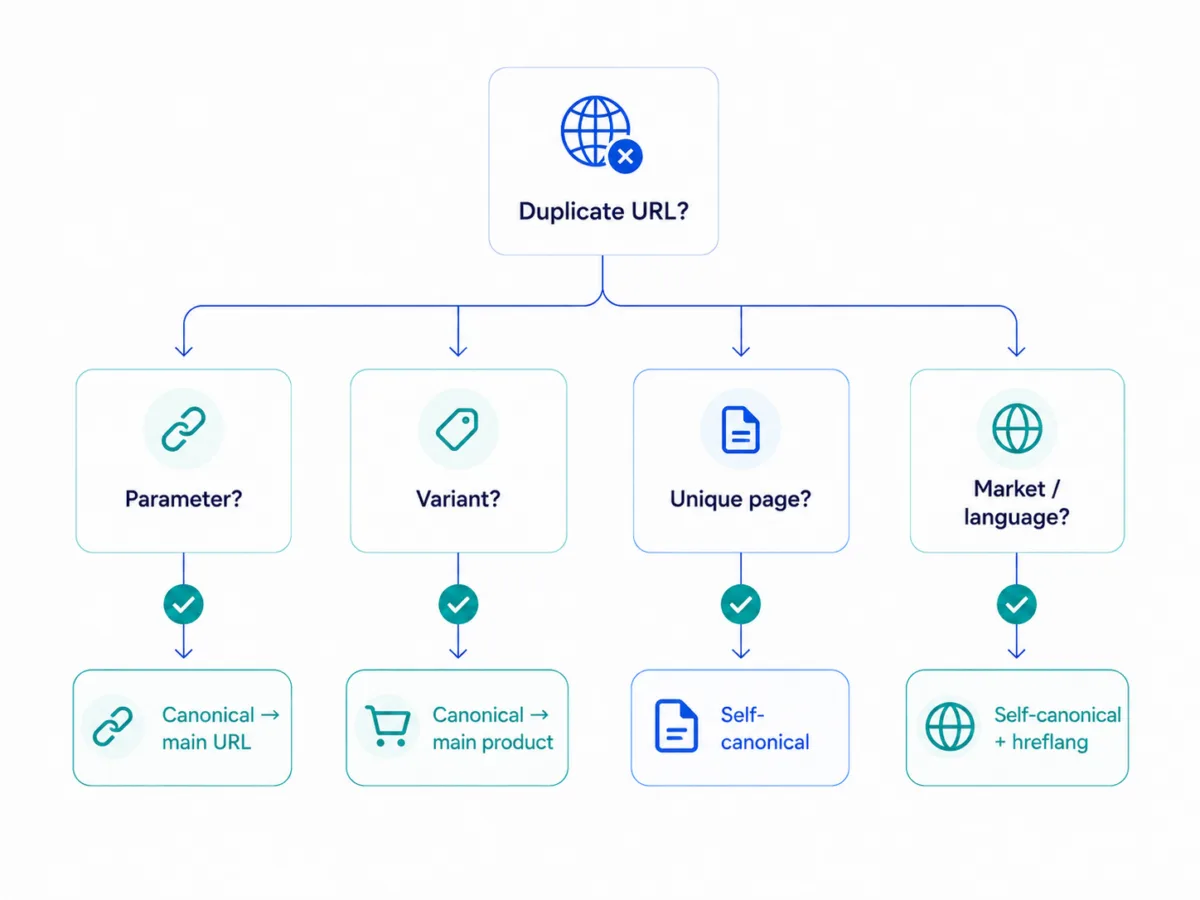
Canonical tags are especially important when several URLs have very similar content.
Typical cases:
URL Parameters #
/product?utm_source=newsletter
/product?sort=price
/product?filter=red
Product Variants #
/blue-t-shirt
/red-t-shirt
/green-t-shirt
Products in Several Categories #
/men/shoes/model-x
/sale/shoes/model-x
/brands/nike/model-x
Sorting and Filters in Shops #
/shoes?sort=price_asc
/shoes?color=black
/shoes?size=42
Print or PDF Versions #
/guides/canonical-tag
/guides/canonical-tag?print=1
/downloads/canonical-tag.pdf
For non-HTML files such as PDFs, canonical can also be set via the Hypertext Transfer Protocol (HTTP) header. Google documents the Link HTTP header with rel="canonical" for this purpose.
Source: Google Search Central – rel=canonical HTTP header
How to Set the Canonical Tag Correctly #
The canonical tag belongs in the <head> of the HTML page.
Correct:
<head>
  <link rel="canonical" href="https://example.ch/main-page/" />
</head>
Important:
- place it in the
<head>, - use an absolute URL,
- use the HTTPS version,
- use the final destination URL,
- no redirect chain,
- no noindex target page,
- no 404 target page,
- only one clear canonical declaration,
- the target page should be similar in content.
In a blog post, Google lists several common mistakes with rel=canonical, including wrong target pages, canonical chains and problematic combinations with other signals.
Source: Google Search Central Blog – 5 common mistakes with rel=canonical
Canonical vs. 301 Redirect vs. noindex vs. robots.txt #
Canonical is often confused with other control mechanisms.
| Tool | Purpose | Does the user see the URL? | Typical use |
|---|---|---|---|
| Canonical | Specify preferred URL | Yes | similar pages, parameters, variants |
| 301 redirect | Permanently redirect | No | old URL, domain migration, merged content |
| noindex | Exclude from search index | Yes | internal search, cart, thin archive pages |
| robots.txt | Control | Yes | reduce crawling, technical areas |
When to Use Canonical #
When several similar URLs should remain accessible, but one main version should be preferred.
Example:
/shoes?sort=price → canonical to /shoesWhen to Use a 301 Redirect #
When a URL is no longer needed.
Example:
/old-page → /new-pageWhen to Use noindex #
When a page should remain accessible but should not appear in Google.
Example:
/search?q=seo
/cart
/thank-you
Important: If Google should see noindex, the page must not be blocked via robots.txt. Google has to be able to crawl the page to detect the noindex directive.
Source: Google Search Central – Robots Meta Tags
When to Use robots.txt #
robots.txt controls crawling, but it is usually not the right solution for canonicalization.
If you block a URL via robots.txt, Google cannot reliably read the canonical tag on that page.
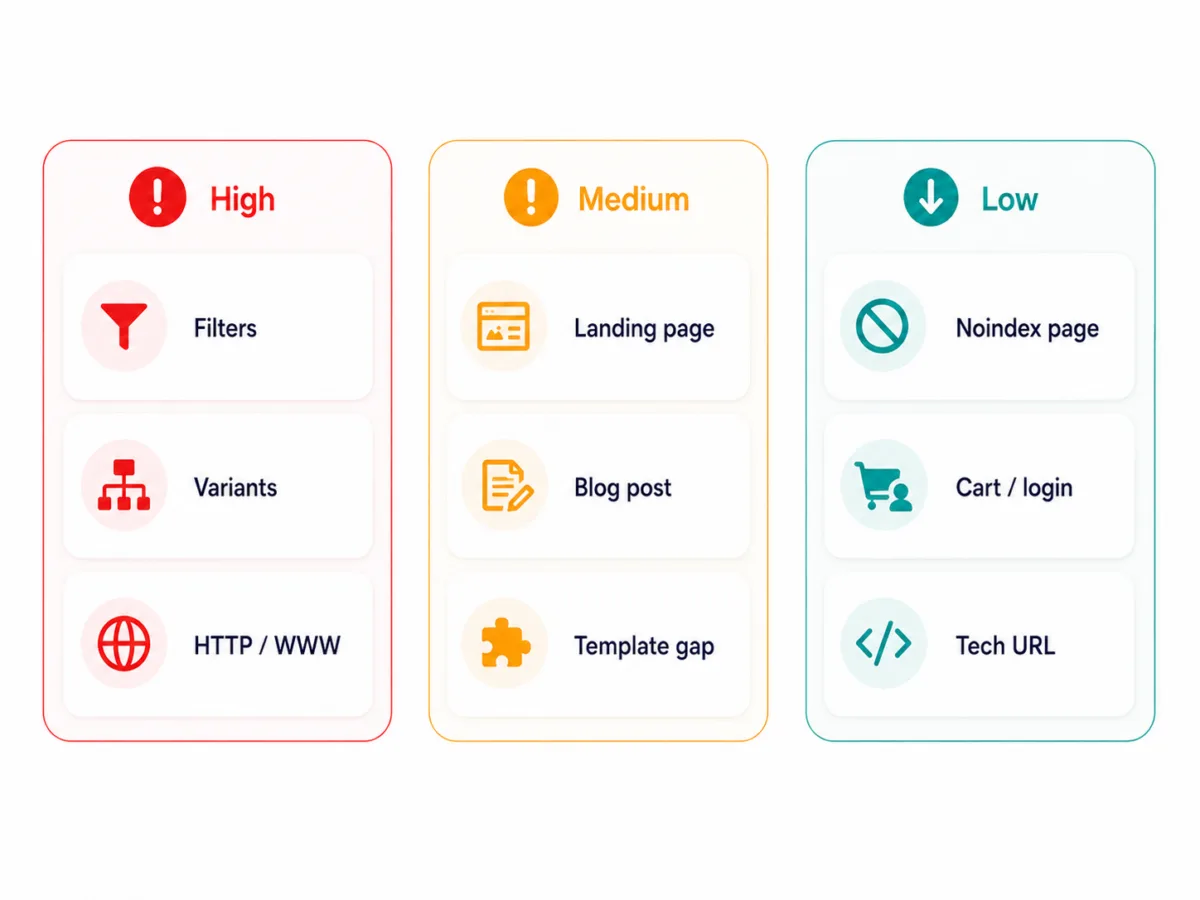
Prioritization: When Is “Missing Canonical Tag” Really Critical? #
Not every missing canonical declaration is equally important.
| Situation | Priority | Why |
|---|---|---|
| Indexable page with URL variants | High | Google has to determine the main version itself |
| Shop category with filters and parameters | High | many similar URLs are possible |
| Product variants with similar content | High | signals can be split |
| via http/https or www/non-www | High | technical duplicates |
| Important landing page without self-referencing canonical | Medium | control signal is missing; critical mainly with URL variants or similar content |
| Blog article without variants | Medium | usually less critical, but best practice |
| noindex page without canonical | Low | canonical usually not needed |
| Cart or login page without canonical | Low | not relevant for the search index |
| Single irrelevant technical URL | Low | low SEO relevance |
The most important rule:
Fix missing canonicals first where indexable pages, duplicate content, parameters, variants or commercially important URLs are affected.
Content Error or Template Error? #
For RankScan, it is crucial to know whether “Missing canonical tag” affects only a single page or an entire template.
Content or Single-Page Issue #
Examples:
- manually created landing page without canonical,
- special page with an individual template,
- PDF without canonical header,
- individual product page with a different configuration.
Solution: Correct the page or configuration directly.
Template or CMS Issue #
Examples:
- Head template does not output a canonical,
- SEO plugin is disabled,
- canonical field is not rendered,
- shop template canonicalizes variants incorrectly,
- language versions set the same canonical,
- several plugins generate contradictory canonicals,
- JavaScript sets the canonical only client-side.
Solution: Check the template, SEO component, plugin configuration or .
A template issue is usually more urgent because it can affect many indexable URLs.
Canonical in WordPress, Shops and CMSs #
WordPress Canonical Tag #
WordPress already generates canonical tags in many setups. SEO plugins such as Yoast SEO, Rank Math or The SEO Framework add and control this logic.
Important for WordPress:
- only one plugin should control canonicals,
- check custom post types,
- check archive pages,
- check paginated pages,
- check WooCommerce product variants,
- check the canonical field on special pages.
If the theme and plugin output canonicals at the same time, duplicate or contradictory tags can occur.
Craft CMS, TYPO3 and Custom Systems #
In custom CMS setups, canonical logic depends heavily on the template.
Important:
- output the canonical in the global head partial,
- define a canonical URL per entry,
- handle multisite and multilingual setups cleanly,
- do not output staging URLs,
- use absolute production URLs,
- define fallbacks.
Shopify and E-Commerce #
Shops often generate canonicals automatically. Still, you should check:
- product variants,
- collection URLs,
- filter pages,
- sorting,
- pagination,
- internal search,
- parameter URLs.
Canonical checks are especially important for shops because many URL variants can be created.
International Sites: Combining Canonical and hreflang Correctly #
On multilingual or regional websites, canonicals and hreflang must not work against each other.
Example:
example.ch/seo-consulting
example.de/seo-consulting
example.at/seo-consulting
If each page is intended for its own market, each version should have a self-referencing canonical.
Additionally, hreflang points to the respective alternatives.
Google recommends hreflang to indicate localized versions of a page.
Source: Google Search Central – Tell Google about localized versions of your page
Wrong would be:
example.ch canonicalizes to example.de
if the Swiss page is supposed to rank independently.
The 6 Most Common Canonical Mistakes #
Mistake 1: Canonical Missing on Important Indexable Pages #
This is the classic “Missing canonical tag” case. Google has to determine the canonical URL itself.
Mistake 2: Canonical Points to a noindex Page #
This is contradictory: a page is named as the main version but should not be indexed.
Mistake 3: Canonical Points to a 404 or Redirect #
A canonical should point to a final, accessible URL with .
Mistake 4: Several Canonicals on One Page #
Several canonicals can be created by a theme, plugin or tag manager. This makes the signal unclear.
Mistake 5: Canonical Chains #
A canonicalizes to B
B canonicalizes to C
Better: A and B point directly to C.
Mistake 6: Wrong Canonical on Pagination #
Not every paginated page should automatically canonicalize to page 1. If page 2, 3 or 4 contains its own content and should remain accessible, it usually needs a self-referencing canonical.
Signal Consistency: Canonical Alone Is Not Enough #
Canonical tags work best when other signals support the same target.
Check:
- internal links point to the canonical URL,
- the sitemap contains only canonical URLs,
- hreflang points to canonical language/country versions,
- redirects lead to the canonical URL,
- the canonical target is indexable,
- the canonical target has status code 200,
- the page is not blocked via robots.txt,
- no contradictory canonicals exist.
Google also names sitemaps as a canonical signal: URLs in the sitemap are an indication of which pages you consider important and canonical.
Source: Google Search Central – Sitemap method
What to Do After a RankScan Finding #
When RankScan reports “Missing canonical tag”, proceed in a structured way.
Step 1: Check Indexability #
First ask:
- Is the page indexable?
- Does it return status code 200?
- Is it internally linked?
- Is it in the sitemap?
- Does it have organic ?
- Is it commercially or editorially important?
If not, the missing canonical is often less critical.
Step 2: Check URL Variants #
Are there variants of the page?
- with and without trailing slash,
- with and without www,
- http and https,
- with parameters,
- across several categories,
- as a print version,
- as a PDF,
- as a language or country version.
If yes, a canonical is much more important.
Step 3: Determine the Cause #
| Cause | Solution |
|---|---|
| SEO plugin disabled | Check plugin configuration |
| Head template missing | Add canonical to the template |
| Custom template | Build in canonical output |
| Parameter URLs | Canonical to the main version |
| Product variants | Define variant strategy |
| Multilingual setup | hreflang + self-referencing canonicals |
| PDF or file | Use HTTP Link header |
| several tags | clean up duplicate output |
Step 4: Define the Canonical Target #
Choose the URL that should rank.
The canonical URL should:
- be accessible,
- return status code 200,
- be indexable,
- match the source page in content,
- be internally linked,
- be listed in the sitemap,
- contain no unnecessary parameters,
- use the preferred HTTPS/www version.
Step 5: Set the Canonical #
Example:
<link rel="canonical" href="https://example.ch/seo-consulting/" />For parameter URL:
https://example.ch/seo-consulting/?utm_source=newsletterCanonical:
<link rel="canonical" href="https://example.ch/seo-consulting/" />Step 6: Crawl Again After the Fix #
After the correction, check:
- Is the canonical present?
- Is it in the
<head>? - Is it absolute?
- Does it point to a 200 URL?
- Does it not point to noindex?
- Is there only one canonical?
- Do sitemap and internal links match?
- Are there no canonical chains?
- Does Google choose the same canonical URL?
Checking in Google Search Console #
You can use the URL Inspection tool in Google to check whether Google has accepted your canonical declaration.
Important fields:
- User-declared canonical
- Google-selected canonical
If these values differ, it does not automatically mean that the canonical is wrong. But it does mean that Google weighs other signals more strongly.
Then check:
- internal links,
- sitemap,
- redirects,
- hreflang,
- content similarity,
- status codes,
- noindex,
- robots.txt,
- canonical chains.
What a Good Canonical Check Looks For #
A good canonical check tests more than just “present or not present”.
A good check detects:
- missing canonical,
- empty canonical,
- relative canonical,
- several canonicals,
- canonical not in the
<head>, - canonical points to 404,
- canonical points to a redirect,
- canonical points to a noindex page,
- canonical chains,
- canonical loops,
- canonical to another language/country version,
- conflict between canonical and hreflang,
- conflict between sitemap and canonical,
- conflict between internal linking and canonical,
- missing self-referencing canonical on indexable pages,
- canonical problems by page type or template.
This turns “Missing canonical tag” into a concrete website health workflow.
Example: Filter URLs Without Canonical #
Initial Situation #
A shop has a category:
https://example.ch/shoes/Filters create many variants:
https://example.ch/shoes/?color=black
https://example.ch/shoes/?size=42
https://example.ch/shoes/?sort=price
RankScan reports:
Insight: “Missing canonical tag”
Priority: High
Affected URLs: 1,240
Analysis #
Most filter pages do not have their own search intent and should not rank separately.
Solution #
The main category receives a self-referencing canonical:
<link rel="canonical" href="https://example.ch/shoes/" />Unimportant filter and sorting pages canonicalize to the main category:
<link rel="canonical" href="https://example.ch/shoes/" />Relevant filters with search volume can be built as separate landing pages:
https://example.ch/shoes/womens-hiking-shoes/with a self-referencing canonical.
Result #
The canonical signals become clearer. Google receives better hints about which URL is intended for which .
Checklist: Setting the Canonical Tag Correctly #
Use this checklist:
- Does every important indexable page have a canonical?
- Is the canonical in the
<head>? - Is the URL absolute?
- Does it use the preferred HTTPS/www version?
- Does the canonical point to an accessible 200 URL?
- Is the target page indexable?
- Is there only one canonical per page?
- Are there no canonical chains?
- Are there no canonical loops?
- Do internal links match the canonical URL?
- Does the sitemap contain only canonical URLs?
- Do hreflang and canonical match?
- Are parameter and filter URLs handled cleanly?
- Are PDF or file versions covered?
- Was the site crawled again after the fix?
In addition, 404 errors help narrow down the cause cleanly and prioritize the next SEO actions.
Frequently Asked Questions (FAQ) About the Canonical Tag #
What is a canonical tag?
A canonical tag is an HTML link element that shows search engines the preferred URL of a page.
What does rel canonical mean?
rel="canonical" is the attribute used to define a URL as the canonical main version.
Is the canonical tag a command?
No. For Google, the canonical tag is a strong signal, but not an absolute command. Google can select a different canonical URL.
Does every page need a canonical tag?
Not technically. But for important indexable pages, a self-referencing canonical is best practice.
What does “Missing canonical tag” mean?
“Missing canonical tag” means that no canonical tag was found on a page. This is especially relevant when the page is indexable or URL variants exist.
How do I set a canonical tag?
In the <head> of the page:
<link rel="canonical" href="https://example.ch/preferred-url/" />
What is a self-referencing canonical?
It is a canonical that points to the current URL itself. It confirms that this URL is the preferred version.
What is the difference between canonical and 301 redirect?
A canonical keeps both URLs accessible and recommends a main version. A 301 redirect permanently redirects users and search engines to another URL.
What is the difference between canonical and noindex?
Canonical consolidates similar URLs onto a preferred version. noindex removes a page from the search index.
Can I combine canonical and noindex?
This is usually not a good idea because the signals can be contradictory. If a page should not be indexed, use noindex. If signals should be consolidated, use canonical.
How does the WordPress canonical tag work?
WordPress and SEO plugins such as Yoast SEO or Rank Math often generate canonicals automatically. It is important that several plugins or theme functions do not output contradictory canonicals at the same time.
How do I check whether Google accepts my canonical URL?
Use the URL Inspection tool in Google Search Console. There you can see the user-declared canonical and the Google-selected canonical URL.
Conclusion: Canonical Tags Create Clarity in the URL Jungle #
The canonical tag is not a ranking trick. It is an important control signal for duplicate content, URL variants and technical SEO.
The RankScan insight “Missing canonical tag” is especially important when indexable pages, shops, parameters, product variants or multiple URL versions are affected. In those cases, a missing canonical can force Google to decide which URL is the main version.
The best approach is:
- prioritize important indexable pages,
- identify URL variants,
- define the canonical main version,
- set the canonical in the
<head>as an absolute URL, - keep internal links, sitemap, hreflang and redirects consistent,
- crawl again after the fix,
- check in Google Search Console whether Google chooses the same canonical version.
This turns “Missing canonical tag” into a clear website health workflow — and your most important content receives an unambiguous main URL.
Sources and Further Reading #
- Google Search Central – Consolidate duplicate URLs
- Google Search Central – What is URL canonicalization?
- Google Search Central – rel=canonical HTTP header
- Google Search Central – Robots Meta Tags
- Google Search Central – Tell Google about localized versions of your page
- Google Search Central Blog – 5 common mistakes with rel=canonical