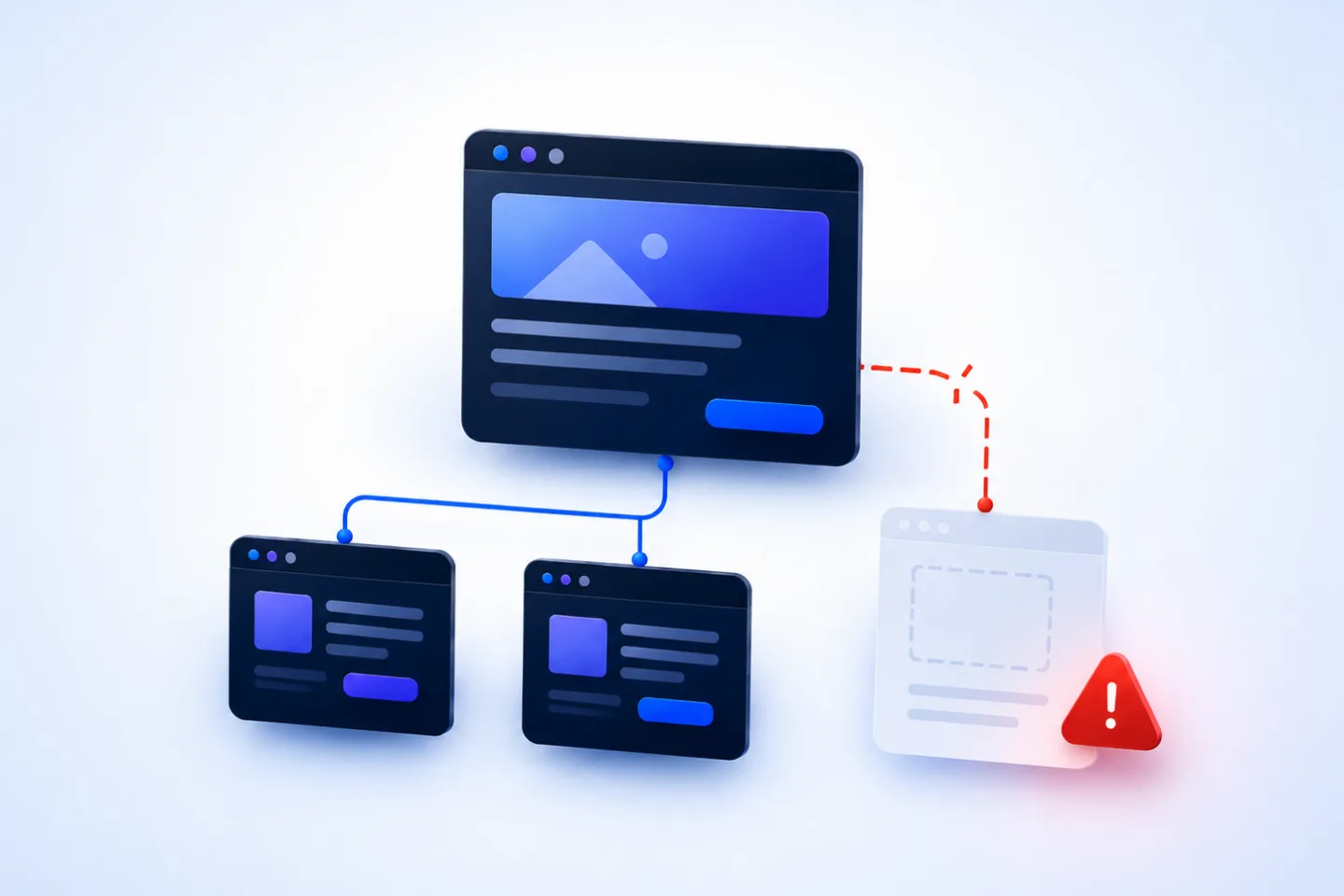
A means that a URL was requested, but the server cannot find the requested page. For individual old or mistyped URLs, this is normal. It becomes a problem when important , deleted pages with backlinks or URLs from the lead nowhere.
This is exactly where the RankScan insight “ (404)” comes in.
The insight shows where your website points to broken links or where relevant URLs respond with the 404 error code. This is a website health topic because 404 errors can slow users down, interrupt internal link signals and make unnecessarily difficult.
The important part is context:
Not every 404 error is bad. But every relevant internal broken link should be checked and handled properly.
In this guide, you will learn what a 404 error is, when it becomes a problem, how to find broken links and how to decide whether to correct a link, set up a or intentionally keep the 404.
- A 404 error code means that the requested resource was not found.
- Individual 404 errors are normal and do not automatically harm a website.
- The most critical cases are internal broken links, deleted pages with backlinks and important URLs from the sitemap or navigation.
- A 404 is useful when a page truly no longer exists and there is no suitable alternative.
- A 410 is a stronger signal for permanently removed content.
- 301 redirects make sense when there is a thematically relevant replacement page.
- Internal links should be corrected directly instead of permanently running through redirects.
- Redirecting all 404 pages to the homepage is not a good solution.
- A good 404 page helps users, but technically it must still return the 404 status code.
- RankScan helps prioritize broken links by source, target, page type and relevance.
What Is a 404 Error? #
A 404 error is an (Hypertext Transfer Protocol), a standardized response from the web server. It means that the server is reachable, but the requested URL does not exist.
Example:
https://example.ch/old-pageResponse:
404 Not FoundGoogle explains that 404 errors are normal when a page does not exist. They do not automatically harm a website. What matters most is how relevant URLs and internal links are handled.
Source: Google Search Central Blog – Do 404s hurt my site?
Typical causes:
- the page was deleted,
- the URL was changed,
- an internal link contains a typo,
- an external website links incorrectly,
- a relaunch was done without a redirect map,
- a product is no longer available,
- a file was moved,
- capitalization does not match,
- an old campaign URL is still circulating.
404, 410, 301 and 302: The Most Important Status Codes #
Not every status code means the same thing. Understanding the difference is important when fixing errors.
| Status code | Meaning | Typical use |
|---|---|---|
| 404 | Not found | Page does not exist or no longer exists |
| 410 | Permanently removed | Content was deliberately deleted for good |
| 301 | Permanently redirected | URL has been permanently replaced |
| 302 | Temporarily redirected | Content is temporarily available under another URL |
| 200 | OK | Page exists and was loaded successfully |
Google describes 404 and 410 as signals for URLs that were not found or removed. Both can lead to URLs being removed from the when Google crawls them again.
Source: Google Search Central – HTTP status codes
404 vs. 410: Which Is Better? #
In practice, a 404 is sufficient in many cases. A 410 is more precise when you are certain that a page has been permanently removed.
Use 404 when: #
- the URL does not exist,
- it is unclear whether the page may return later,
- the requests are typos or random requests,
- external websites link to incorrect URLs,
- you do not have a suitable replacement page.
Use 410 when: #
- content has been deliberately and permanently deleted,
- there is no replacement page,
- the URL should not be reused,
- you want to send search engines a stronger removal signal.
Important: Neither 404 nor 410 should be used when there is a relevant successor page. In that case, a is usually better.
Do 404 Errors Harm Your Search Engine Optimization (SEO)? #
The short answer: Not automatically.
A 404 error is not a direct reason for a penalty. Google expects the web to change and pages to disappear. 404 errors mainly become problematic when they interrupt important signals or user paths.
Unproblematic 404 Errors #
Usually uncritical cases include:
- completely invented URLs,
- spam requests,
- old external links without relevance,
- deleted content without a replacement,
- intentionally removed campaign pages,
- URLs that were never linked internally.
Problematic 404 Errors #
The most relevant cases are:
- internal links pointing to 404 pages,
- 404 URLs in the XML sitemap (),
- deleted pages with strong backlinks,
- old URLs after a relaunch,
- product or category pages with organic traffic,
- campaign landing pages,
- frequently visited URLs,
- URLs with ranking history.
For RankScan, the plain number of 404 errors is therefore not what matters most. Their context is decisive.
Why Internal Broken Links Are Particularly Important #
A broken link is a link that points to a URL that can no longer be reached. Internal broken links are particularly problematic.
Example:
/en/services/seo-consulting → /en/services/old-pageIf /en/services/old-page returns a 404, your own website is sending users and crawlers into a dead end.
This has several consequences:
- Users are more likely to leave.
- Link signals are not passed on in a meaningful way.
- Crawlers waste time on non-existing URLs.
- The quality of internal linking decreases.
- Important content appears less well maintained.
Google recommends supporting users with helpful 404 pages and advises site owners to fix broken links on their own website.
Source: Google Search Central – Create useful 404 pages
External 404 Errors: Not Always Your Problem #
Not every 404 is caused by your website. External websites can link to you incorrectly or use outdated links.
Example:
https://example.ch/seo-agency-lucerne-oldIf this URL never existed or was deleted long ago, the 404 itself is not necessarily a problem.
Still, you should review external 404 URLs if they:
- have valuable backlinks,
- are visited often,
- belonged to important old content,
- originate from PR, campaigns or partner pages,
- could lead users to a relevant alternative.
In such cases, a 301 redirect can make sense.
Soft 404: When an Error Page Incorrectly Returns 200 #
A occurs when a non-existing page looks like an error page, but technically returns the status code .
Example:
URL: /old-page
Content: "This page was not found"
Status code: 200 OK
This is problematic because search engines may interpret the page as a valid page.
Google describes soft 404 errors as pages that tell users a page does not exist but do not return an appropriate 404 status code.
Source: Google Search Central – Soft 404 errors
Soft 404s often occur because of:
- redirecting all errors to the homepage,
- error pages with a 200 status code,
- empty product pages,
- internal search pages without results,
- sold-out products without a clear strategy,
- with hardly any content.
Important: A good 404 page may be beautifully designed. But technically it must still return the 404 status code.
Finding 404 Errors: How to Proceed #
1. Use RankScan #
A good 404 check does not simply display 404 errors as a list. It groups them by relevance.
Important questions:
- Which internal pages link to 404 URLs?
- Which 404 targets are affected?
- Are there 404 URLs in the sitemap?
- Are important page types affected?
- Are there backlinks to 404 pages?
- Are the errors new or old?
- Are many URLs affected after a relaunch?
- Are there patterns in templates or navigation?
2. Check Google Search Console #
Google shows crawling and indexing issues from Google’s perspective. 404 and soft 404 notices can appear there.
Important: Search Console does not show all internal broken links completely. It is helpful, but it is not a replacement for a crawl.
3. Crawl the Website #
A website crawler helps you systematically find internal broken links.
Check:
- link source,
- target URL,
- status code,
- ,
- page type,
- depth within the website,
- internal frequency,
- sitemap membership,
- canonical targets,
- redirect chains.
4. Check Backlink Data #
For old URLs with external links, a backlink check is worthwhile.
Ask:
- Are there high-quality backlinks to the 404 URL?
- Is there referral traffic?
- Was the URL important in the past?
- Is there a thematically suitable new page?
If yes, you should usually set up a 301 redirect.
5. Check Server Logs #
Server logs show which 404 URLs are actually being requested.
This helps distinguish between:
- frequently used old URLs,
- bot spam,
- typos,
- real user problems,
- consequences of a relaunch.
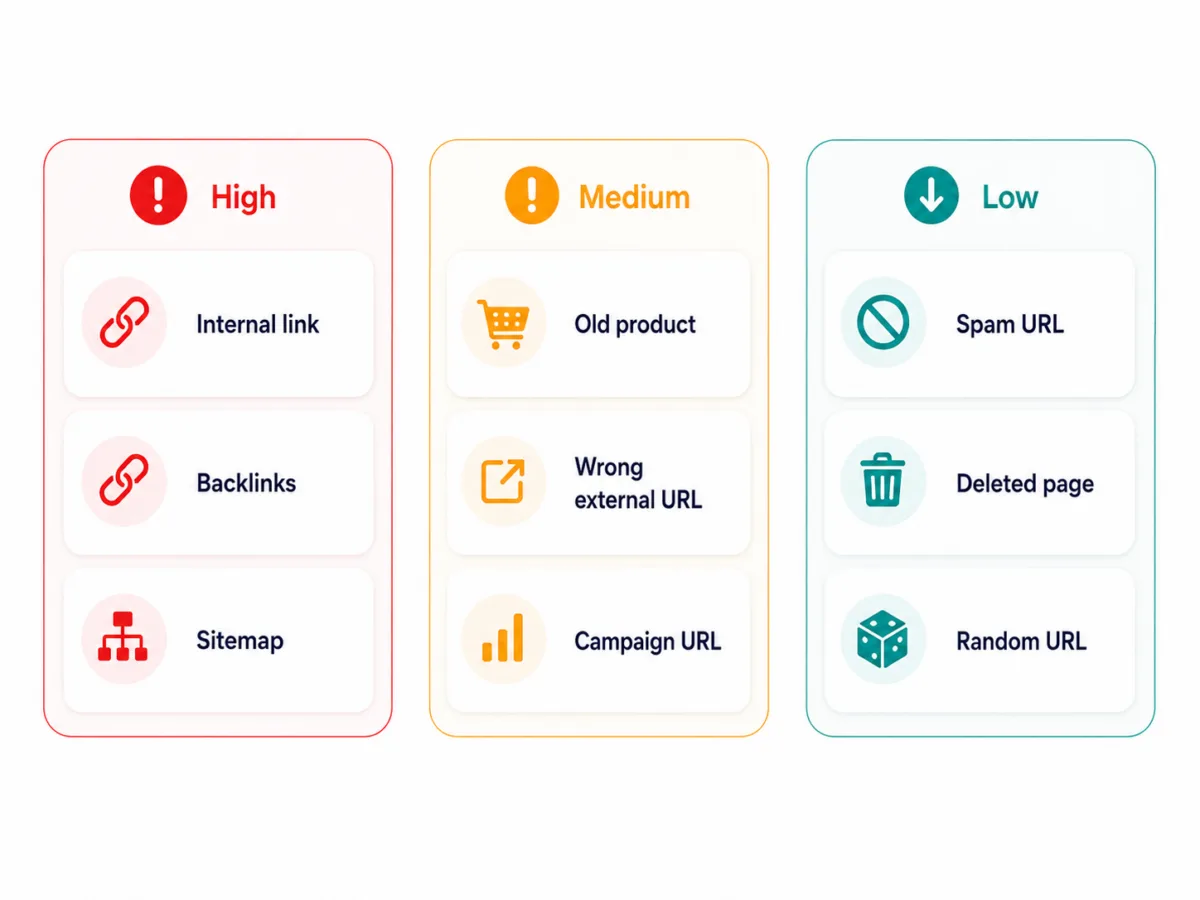
Prioritization: Which 404 Errors Matter? #
Not every 404 error deserves the same attention.
| Situation | Priority | Why |
|---|---|---|
| Internal link points to 404 | High | your own website sends users and crawlers nowhere |
| 404 URL has strong backlinks | High | link signals are lost |
| 404 URL used to be a ranking/traffic page | High | organic potential may be lost |
| 404 URL is in the XML sitemap | High | sitemap sends the wrong signal |
| Many 404s after a relaunch | High | redirect map is missing or incomplete |
| Navigation link points to 404 | High | major user experience (UX) and crawling issue |
| Product page without replacement | Medium | depends on assortment and demand |
| Single old incorrect external URL | Low to medium | only relevant with traffic/backlinks |
| Spam URLs returning 404 | Low | normal and usually ignorable |
| Intentionally deleted irrelevant page | Low | 404 or 410 is correct |
The most important rule:
Fix internal broken links and 404 pages with backlinks first. Do not overestimate random external 404 requests.
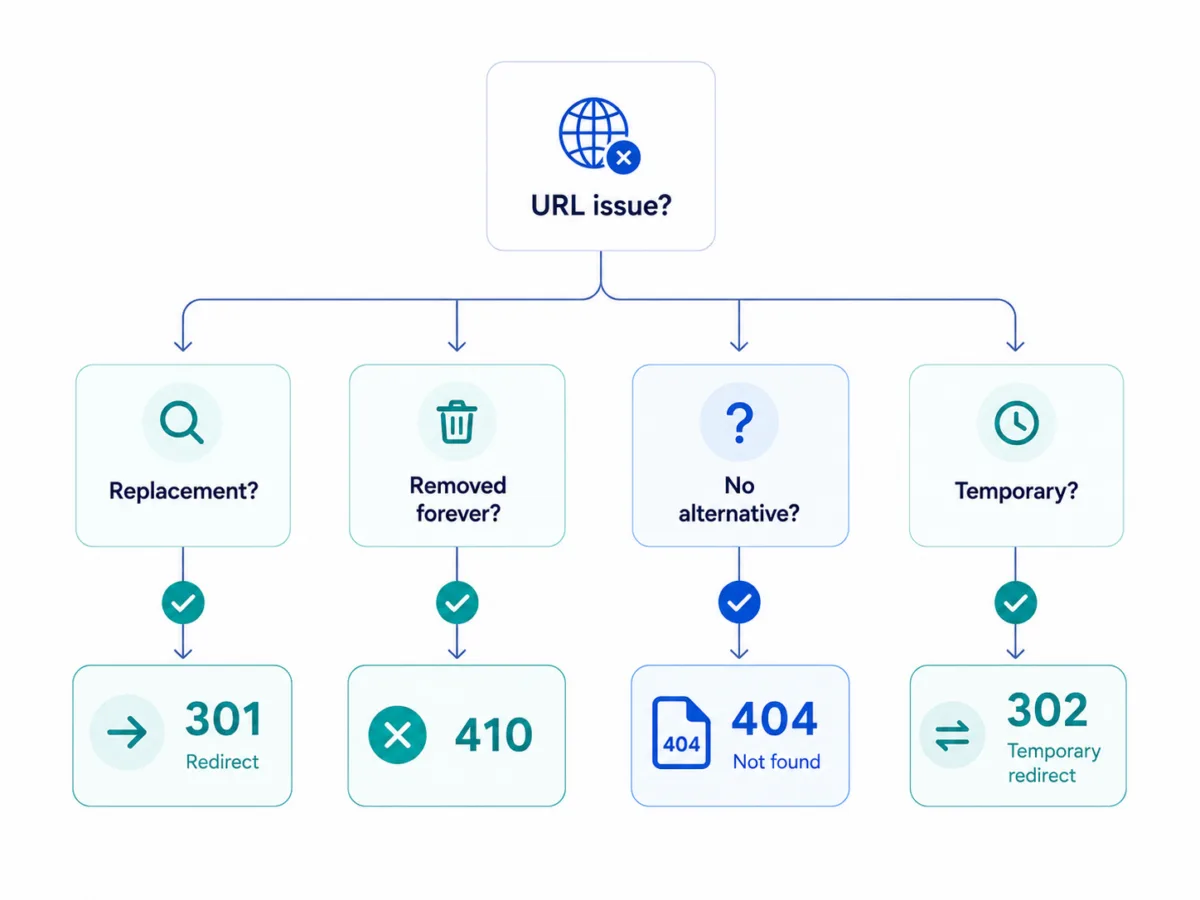
Choosing the Right Solution #
404 errors are handled differently depending on the cause.
| Situation | Best solution |
|---|---|
| Internal link contains a typo | Correct the link in the |
| Page was moved | 301 redirect to the new URL |
| Content was merged | 301 redirect to the new main page |
| Content was deleted without replacement | Keep 404 or 410 |
| Old URL has strong backlinks | 301 redirect to a suitable alternative |
| Product is permanently discontinued | suitable category, successor product or 410 |
| Product is temporarily unavailable | keep the page, do not return 404 |
| Error page returns 200 | return a real 404 status code |
| All 404s redirect to homepage | remove this and define suitable targets |
Fixing 404 Errors: The RankScan Workflow #
When RankScan reports “Broken Links (404)”, you should proceed in a structured way.
Step 1: Check Source and Target #
Distinguish:
- Which URL returns 404?
- Which page links to it?
- Is it an internal or external link?
- Is the link in the navigation, footer, content or sitemap?
- How often does the link occur?
A 404 link from the main navigation is much more important than a single old link in an archive post.
Step 2: Assess Relevance #
Check:
- Does the 404 URL have backlinks?
- Did it previously have traffic?
- Is there a suitable new URL?
- Is the page important for the business?
- Is it used in campaigns?
- Is it included in the sitemap?
- Is it used frequently in internal links?
Step 3: Choose the Action #
Decide:
Correct the link?
Set up a 301 redirect?
Intentionally keep 404/410?
Restore the page?
Keep the product page live?
Important: Not every 404 should be redirected. An irrelevant redirect is worse for users than an honest 404 page.
Step 4: Correct Internal Links Directly #
When you find an internal broken link, correct the link at the source.
A 301 redirect can additionally make sense, but it does not replace clean internal linking.
Bad:
Internal link → old URL → 301 → new URLBetter:
Internal link → new URLStep 5: Set Redirects Properly #
If there is a suitable replacement page, use a 301 redirect.
Example:
/old-seo-consulting → /seo-consultingMake sure that:
- the target is thematically relevant,
- there is no redirect to the homepage without context,
- there are no redirect chains,
- there are no redirect loops,
- the target page returns status code 200,
- internal links are updated afterwards.
Google recommends keeping redirects for URL changes in place for as long as possible. For signal transfer, Google’s documentation mentions at least one year as an important guideline.
Source: Google Search Central – Redirects and Google Search
Step 6: Clean Up the Sitemap #
An XML sitemap should contain only relevant, indexable 200 URLs.
Remove:
- 404 URLs,
- 301 URLs,
- URLs,
- non-canonical URLs,
- parameter URLs without an indexing purpose.
Step 7: Crawl Again #
After making corrections, check again:
- Are there still internal 404 links?
- Are redirects correct?
- Are there redirect chains?
- Are sitemap URLs clean?
- Does the 404 page really return 404?
- Are important old URLs redirected appropriately?
- Were relevant pages accidentally left as 404?
Designing a 404 Page: Keep Users Instead of Losing Them #
Even with good maintenance, users will occasionally land on a 404 page. That is why the 404 page should be helpful.
A good 404 page includes:
- a clear explanation that the page was not found,
- link to the homepage,
- site search,
- links to important areas,
- navigation and footer,
- brand design,
- optional contact option,
- optional humorous or human wording.
Important: The page must not return status code 200. Technically, it must remain a real 404.
Example of a good message:
This page was not found.
It may have been moved or deleted. Use the search or go back to the homepage.
When You Should Not Return 404 for a Page #
Not every removed or unavailable page should return 404.
Product Temporarily Unavailable #
If a product is only temporarily sold out, the product page should usually remain live.
Better:
- explain availability,
- show alternatives,
- offer notification,
- link similar products.
Page Was Replaced #
If there is a clear successor, use 301.
Campaign Landing Page with Backlinks #
If a campaign has ended but backlinks or traffic exist, redirect to a thematically relevant page.
Category Without Current Products #
If the category is strategically relevant, it can remain live and show alternatives.
404 Errors in E-Commerce #
Online shops have specific 404 risks.
Typical cases:
- sold-out products,
- deleted products,
- variant URLs,
- old category URLs,
- filter URLs,
- manufacturer changes,
- seasonal products,
- relaunches of shop systems.
Recommendation:
| Situation | Solution |
|---|---|
| Product will return | Keep page online, explain availability |
| Product has a successor | 301 to successor product |
| Product was deleted without replacement | 410 or 404 if there is no demand/backlinks |
| Product has backlinks | 301 to suitable category or successor |
| Category changed | 301 to new category |
| Filter URL irrelevant | check noindex/canonical, do not simply return 404 |
| Seasonal product | keep page and update seasonally |
Common Mistakes with 404s and Broken Links #
Mistake 1: Redirecting All 404s to the Homepage #
This is rarely useful. Users expect relevant content, not the homepage.
Google can treat such irrelevant redirects as soft 404s.
Mistake 2: Error Page Returns Status Code 200 #
A beautifully designed 404 page is good. But if it technically returns 200, it creates a soft 404.
Mistake 3: Not Correcting Internal Links #
Redirects help, but internal links should point directly to the final destination page.
Mistake 4: Redirect Chains #
A → B → CBetter:
A → CMistake 5: 404 URLs in the Sitemap #
The sitemap should not contain unreachable URLs.
Mistake 6: Deleting Old Pages with Backlinks Without Replacement #
If an old URL has good backlinks, you should look for a suitable redirect.
Mistake 7: Overvaluing Spam 404s #
Not every 404 request is a problem. Bots constantly request invented URLs. You do not need to fix all of them.
What a Good 404 Check Looks For #
A good 404 check should do more than list broken URLs.
A good check detects:
- internal links to 404,
- 404 URLs in the sitemap,
- 404s from navigation, footer or content,
- 404 targets with many internal links,
- 404 targets with backlinks,
- 404s after a relaunch or URL changes,
- suspected soft 404s,
- error pages with status code 200,
- redirect chains,
- redirect loops,
- 404s by page type,
- 404s by template,
- recurring patterns,
- priority by traffic, link and page relevance.
This turns “Broken Links (404)” into a concrete website health workflow.
Example: Relaunch Without a Redirect Map #
Initial Situation #
A company relaunches its website. The old URL structure was:
/services/seo
/services/google-ads
/services/mautic
After the relaunch, the new URLs are:
/seo-consulting
/google-ads-management
/marketing-automation-mautic
After the crawl, RankScan reports:
Insight: “Broken Links (404)”
Priority: Medium
Affected URLs: 146
Analysis #
Many old URLs return 404. Some have internal links from old blog articles and external backlinks.
Solution #
- Create a redirect map:
/services/seo → /seo-consulting
/services/google-ads → /google-ads-management
/services/mautic → /marketing-automation-mautic
Update internal links directly.
Clean up the sitemap.
Keep old irrelevant URLs without replacement as 404 or 410.
Crawl again.
Result #
Users and search engines land on suitable pages again. Important old signals are transferred to the new URLs.
Checklist: Fixing 404 Errors #
Use this checklist:
- Are there internal links to 404 URLs?
- Are 404 URLs in the sitemap?
- Are there 404 URLs with backlinks?
- Did 404 URLs previously have traffic?
- Is there a suitable replacement page?
- Does the link need to be corrected or redirected?
- Is a 301 redirect thematically sensible?
- Are there redirect chains or loops?
- Does the 404 page really return status code 404?
- Are there soft 404 warnings?
- Are product and category strategies clean?
- Were internal links updated after redirects?
- Was the website crawled again after the fix?
In addition, canonical tags, duplicate content, noindex and robots.txt and improving Google rankings help narrow down the cause and prioritize the next actions.
For further optimization, keyword cannibalization and URL mismatch are especially relevant because these topics are directly connected to how pages are evaluated and found.
Frequently Asked Questions (FAQ) About 404 Errors #
What does 404 mean?
404 means that the server is reachable, but the requested URL was not found.
Is a 404 error bad for SEO?
Not automatically. Individual or intentionally deleted pages with 404 are normal. Internal broken links, 404 URLs in the sitemap or old URLs with backlinks and traffic are problematic.
How can I find broken links?
With RankScan, Google Search Console, website crawlers, backlink tools and server logs.
How do I fix a 404 error?
That depends on the cause. You correct internal links directly. Moved pages are redirected with 301. Content deleted without replacement can remain 404 or 410.
Should I redirect all 404 pages to the homepage?
No. This is usually a poor solution and can be treated as a soft 404. Redirects should point to thematically relevant pages.
What is a soft 404?
A soft 404 is a page that appears to be an error page, but technically returns status code 200 or redirects irrelevantly.
What is the difference between 404 and 410?
404 means “not found”. 410 means “permanently removed”. 410 is more precise when content has been permanently deleted.
What should a good 404 page look like?
It should clearly explain that the page was not found, provide helpful links or search and technically return the 404 status code.
Do I need to fix incorrect external links to my website?
Not always. If they have no relevance, they can remain 404. If they have backlinks, traffic or user value, a redirect makes sense.
What does “Broken Links (404)” mean in RankScan?
The insight means that RankScan found links or URLs that respond with 404. The next important step is prioritization by internal linking, backlinks, sitemap, traffic and page type.
Conclusion: 404 Errors Are Normal, Broken Internal Links Are Not #
404 errors are part of the web. Not every missing URL is an SEO problem. What matters is whether important user paths, internal links, backlinks, sitemap URLs or old ranking pages are affected.
The RankScan insight “Broken Links (404)” helps identify and prioritize exactly these cases.
The best approach is:
- distinguish internal and external 404s,
- prioritize important URLs,
- determine the cause,
- correct internal links,
- set suitable 301 redirects,
- intentionally keep irrelevant deleted content as 404 or 410,
- avoid soft 404s,
- clean up the sitemap,
- crawl again after the fix.
This prevents broken links from becoming dead ends and turns them into a clear website health process for better user guidance, cleaner crawling and more stable SEO signals.