Website Health shows the technical state of your website. RankScan crawls your pages regularly and checks them for errors. It adds PageSpeed refers to the loading time and responsiveness of a website. PageSpeed optimisation covers measures that improve loading time, responsiveness and visual stability.Open glossary entry → from real Chrome data and access for AI assistants. If RankScan has not finished a Crawling is the process by which a search engine bot fetches a URL and downloads its content. It is the first step before a page can be indexed.Open glossary entry → yet, the page says “No completed crawl yet.”.
How to read the page #
Open “Website Health” in the menu. The page has these sections, from top to bottom:
- Disruptions If there is a disruption card at the top, something serious has happened. The card explains what and since when. More below.
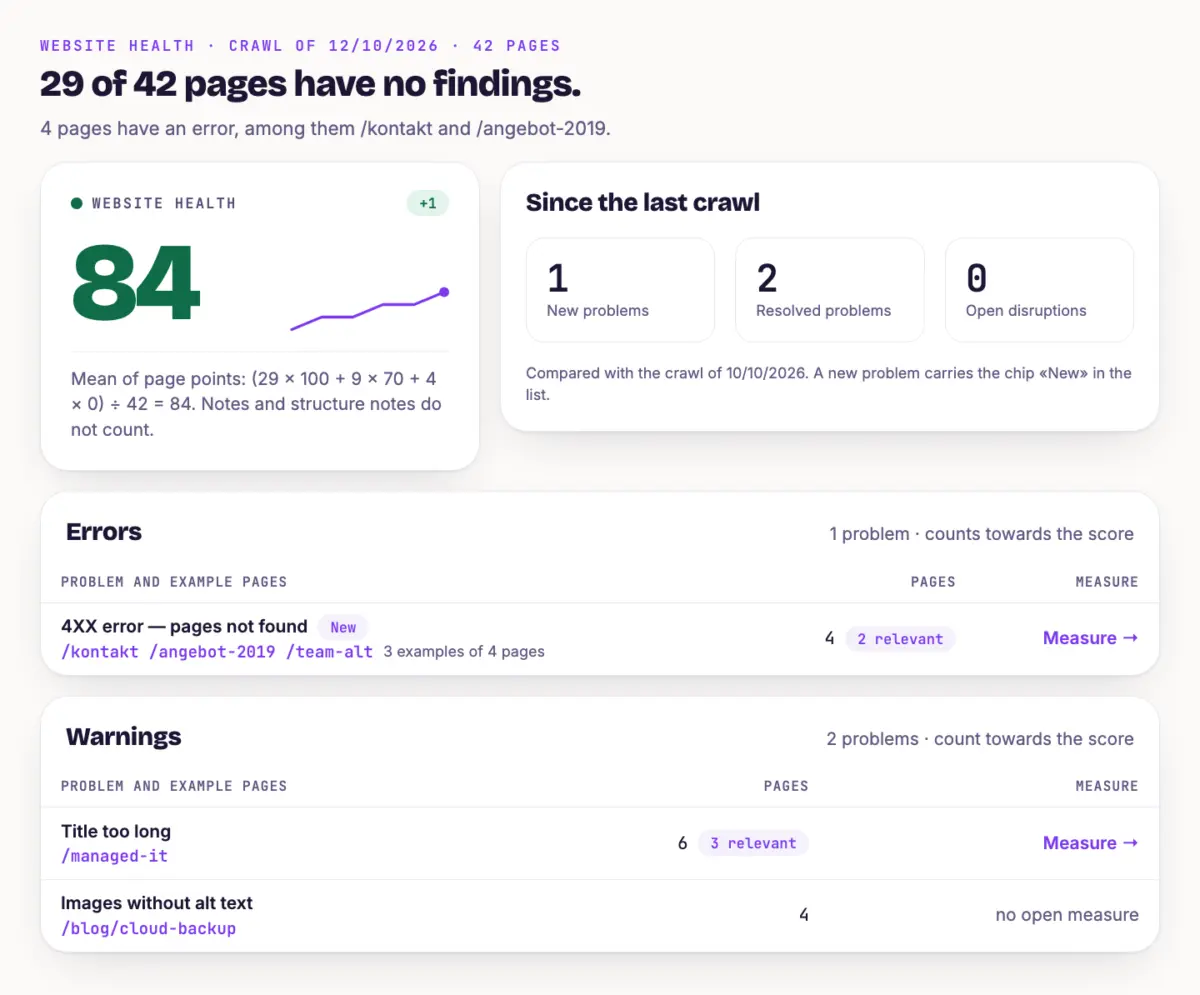
- Header A sentence like “29 of 42 pages have no findings.” shows how many pages are clean.
- Score The score sums up the technical state in a number from 0 to 100. The sentence next to it explains how it is calculated.
- Since the last crawl This shows new problems, fixed problems and open disruptions.
- Problems The findings are in four groups. More in the next section.
- Access for AI assistants Five checks show whether AI assistants can read your website. See Check Access for AI Assistants.
- Page speed The Largest Contentful Paint (LCP) measures when the largest visible content element in the viewport has loaded, representing the perceived loading speed.Open glossary entry →, Interaction to Next Paint (INP) measures how quickly a page responds to user input across all interactions and represents interactivity.Open glossary entry → and Cumulative Layout Shift (CLS) measures how much visible elements shift unexpectedly during loading and represents the visual stability of a page.Open glossary entry → values come from Chrome users on mobile devices. Each value is “good”, “medium” or “poor”. Good means: LCP up to 2.5 seconds, INP up to 200 milliseconds, CLS up to 0.1.
The four groups #
- Errors They weigh most. A page with an error counts as 0 points in the score.
- Warnings They lower the score less. A page with a warning counts as 70 points.
- Notes They do not count in the score. The group is collapsed, click “Show”.
- Structure notes They concern structure and readability for AI. They do not count in the score either and are collapsed.
Each row names the problem, up to three example pages and the number of affected pages. A “New” chip shows that the problem first appeared in the last crawl. The “relevant” chip counts the pages that belong to your topics, rank or are cited.
How to fix a finding #
Start with the errors, then the warnings. Within a group, start with the rows that have many relevant pages.
In the “Measure” column, click “Measure →”. The measure describes the problem and says how to fix it. If it says “no open measure”, there is no separate task for it.
Click an example page to see all problems on that page. You also find the page detail under “Pages”, card “Technical issues”.
Fix the problem on your website. Then report the measure as done. RankScan checks it with the next crawl, see Prioritize and Work Through Measures.
Disruptions #
RankScan reports a disruption in three cases only: the crawl failed, there are new critical errors, or page speed has slipped into “poor”. The card shows “Before”, “Current” and “Newly detected”. It also says from when the disruption counts as critical.
The disruption closes when the next complete crawl no longer finds the error. You then get an email. You choose who gets these emails under notifications, see [→ E].
How long RankScan keeps crawls #
RankScan keeps all crawls for a while, then one per month. How long depends on the plan: Starter keeps all for 30 days, then monthly up to 180 days. Pro 60 and 365 days. Enterprise 90 and 730 days.
Tip #
Fix errors on pages that belong to your topics first. An error on an old archive page costs you less than one on your most important offer page.
Next step #
You choose how many pages RankScan crawls and how deep. Configure Scans shows how.