RankScan measures three things: Website Health, Search visibility describes how present and findable a website is in the organic search results. It is not the same as traffic, but reflects theoretical findability.Open glossary entry → and AI Visibility describes whether and how visible a brand, website or person is in AI-generated answers. It measures mention, position, description and source linking across multiple platforms and prompts.Open glossary entry →. For each type you decide how RankScan measures. Only admins can change the settings. All other team members see the current state.
How to set up the measurement types #
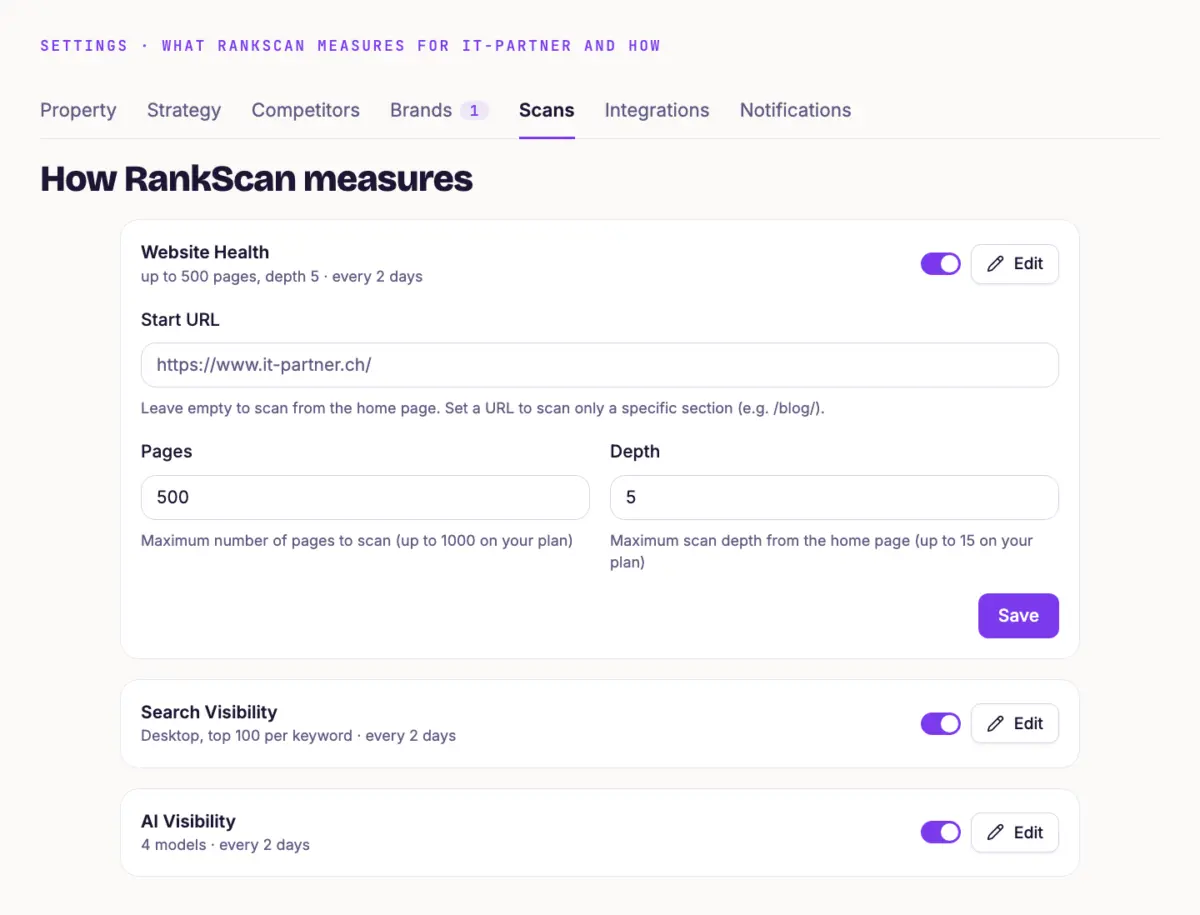
Open “Settings” and the “Scans” tab. Under “How RankScan measures” you see the three types with summary, frequency and switch. Click “Edit” to adjust a type. If a type is not set up yet, click “Enable”.
- Website Health Under “Start URL” you enter where the Crawling is the process by which a search engine bot fetches a URL and downloads its content. It is the first step before a page can be indexed.Open glossary entry → starts. Empty means: on the home page. With a path like /blog/ you scan only one section. Under “Pages” and “Depth” you set how many pages RankScan crawls and how many clicks deep.
- Search Visibility Under “Device” you choose desktop or mobile. Under results per A keyword is the search term users enter into a search engine to find information, products or providers. Keywords are the basis against which rankings and visibility are measured.Open glossary entry → you set how many search results RankScan evaluates per keyword.
- AI Visibility Tick the AI assistants RankScan should ask. At least one stays selected.
Next to each field you see what your plan allows. Starter allows 200 pages, depth 5 and 2 AI assistants. Pro allows 500 pages, depth 10 and 3 AI assistants. Enterprise allows 1000 pages, depth 15 and 4 AI assistants. The first crawl of a property covers at most 100 pages.
How often RankScan measures #
Open “Settings” and the “Property” tab. The “Scan Frequencies” card shows how often RankScan measures each type automatically. Your plan sets the frequency. You cannot change it yourself.
Start a manual scan #
If you need fresh figures, for example after a change to the website, start a scan yourself:
In the “Scan Frequencies” card, click “Manual Scan”.
Choose a measurement type or “Scan All Dimensions”.
Each type counts separately. “Scan All Dimensions” with three active types therefore uses three scans. The menu shows how many are left, for example “4 of 5 scans remaining”. Starter has 5 manual scans per month, Pro 10 and Enterprise 20. While a scan is running or the quota is used up, the button is locked.
Tip #
If your website has a large blog but few offer pages, do not limit the crawl to /blog/. Let it start on the home page. That way RankScan checks the pages that matter for your topics first.
Next step #
Read Website Health and Fix Findings shows what the crawl finds and how to fix it.