AI assistants base their answers on web sources. RankScan collects the sources from the answers to your prompts. So you see which pages the answers cite and whether your own pages are among them.
What you see in the “Sources” tab #
Open “AI Visibility describes whether and how visible a brand, website or person is in AI-generated answers. It measures mention, position, description and source linking across multiple platforms and prompts.Open glossary entry →” and the “Sources” tab.
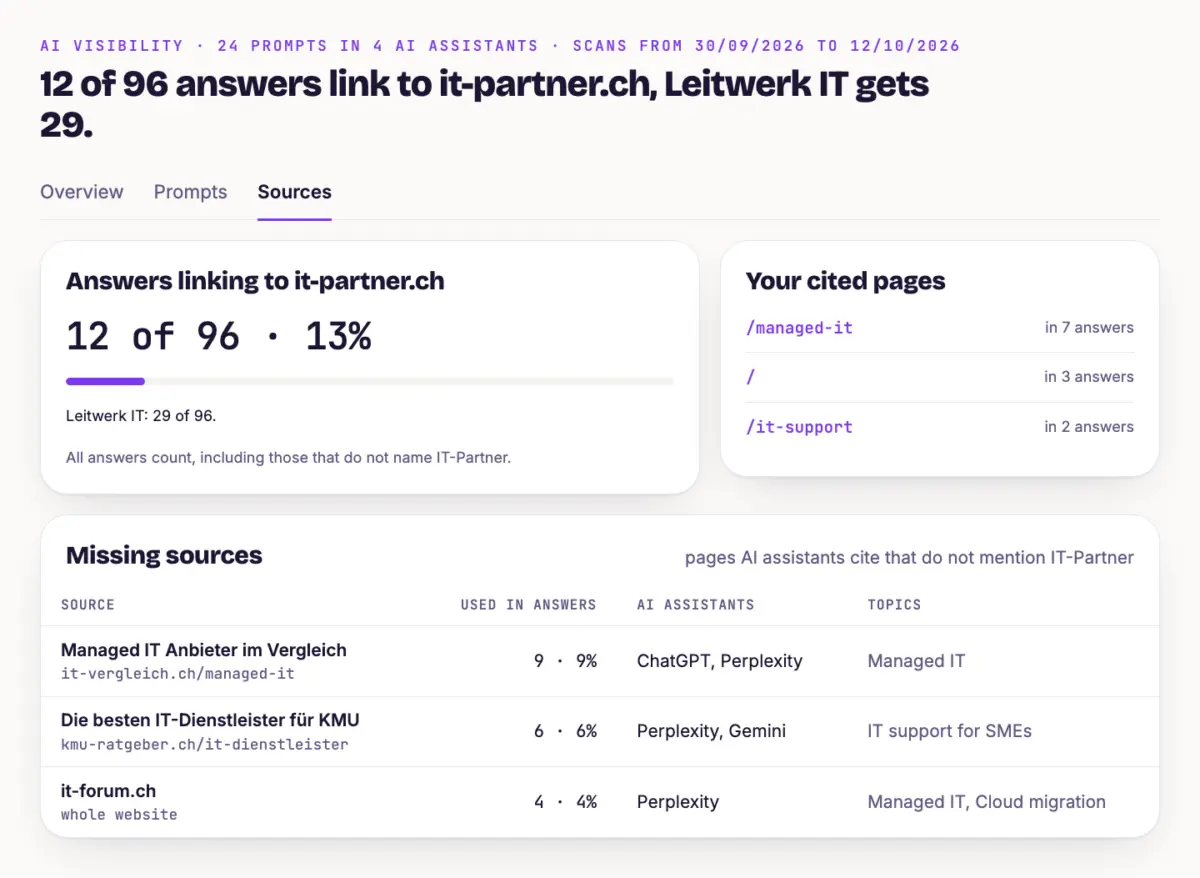
- Answers linking to your domain How many answers link your website, next to the leader's value. All answers count, including those that do not name your brand.
- Your cited pages Which of your pages AI assistants cite and in how many answers.
- Missing sources Pages AI assistants cite that do not mention your brand. For each source you see how many answers use it, which AI assistants and which topics. Your competitors' pages are not in this list.
- Already mention you Cited pages that already mention your brand.
You see the sources of a single answer in the “Prompts” tab: open a prompt, choose an answer, expand the sources.
How to use it #
Start with the missing sources that many answers use.
Check whether you can appear there, for example on industry portals, in directories or comparison articles.
Close gaps with your own citable pages: clear facts, questions with a direct answer, tables and references.
Read Backlinks and Close Gaps shows domains that link to your competitors and not to you.
Tip #
A missing source that appears in many answers and in several AI assistants is a very concrete opportunity. Whether an entry there changes your mentions shows in the history.
Next step #
To make sure AI assistants can read your own pages, check access in Check Access for AI Assistants.