Search visibility describes how present and findable a website is in the organic search results. It is not the same as traffic, but reflects theoretical findability.Open glossary entry → shows where your website stands on Google. RankScan measures the positions of your A keyword is the search term users enter into a search engine to find information, products or providers. Keywords are the basis against which rankings and visibility are measured.Open glossary entry → and compares you with the leader and your competitors. With Google Search Console (GSC) is a free Google tool that shows how a website performs in organic search, with data on impressions, clicks, click-through rate and average position, plus indexing and technical issues.Open glossary entry → connected, clicks and Impressions indicate how often a website's search result was shown in Google Search, regardless of whether it was clicked. They are a core Google Search Console metric and reflect a page's raw visibility for given queries.Open glossary entry → are added.
How to read the overview #
Open “Search Visibility” in the menu and the “Overview” tab.
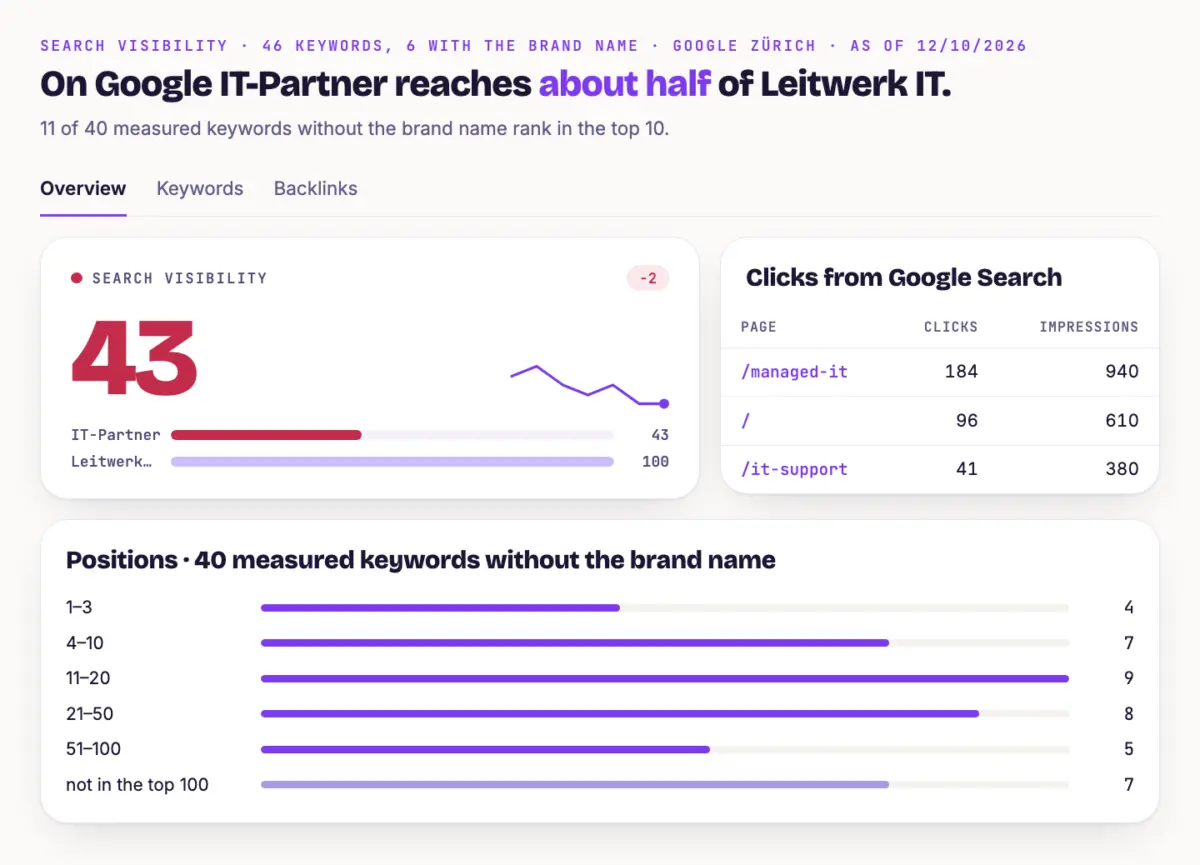
- Score The sentence at the top says how many of your keywords rank in the top 10. The score measures your points per keyword against the leader and a fixed target.
- Clicks from Google Search Clicks and impressions of your top pages over the last 30 days. The card appears with Search Console connected.
- History The toggle switches between “Top 10” and “Score”.
- Positions How many keywords rank at 1–3, 4–10, 11–20, 21–50 and 51–100.
- Winners and losers Keywords with the biggest moves.
- Comparison Points per keyword for you, the leader and your competitors.
- Topics and Landing pages How well each topic and each page ranks. “Avg. position” comes from your rankings.
Keywords with the brand name do not count in these values.
The “Backlinks” tab shows how many websites link to you, see Read Backlinks and Close Gaps.
Find quick opportunities #
Open the “Keywords” tab. The filters show three kinds of opportunities:
- Opportunities 11–20 Keywords just behind page one. Small improvements can move them up.
- Losses Keywords that dropped since the last run.
- Different page than chosen For these keywords a different page ranks than the topic page.
The matching tasks are under “Measures”: “Pages at the edge of the top positions”, “Good positions, few clicks”, “Wrong page ranks” and “Gap to the leader”.
Maintain and Weight Keywords shows how to add keywords and check their potential.
Tip #
Start with the “Opportunities 11–20” filter. If the page of such a keyword already has impressions, RankScan also reports it under “Pages at the edge of the top positions”. That is usually where the lever is biggest.
Next step #
Add and Compare Competitors shows how to add competitors properly and make comparisons meaningful.