Many websites look after Google Google Search Console (GSC) is a free Google tool that shows how a website performs in organic search, with data on impressions, clicks, click-through rate and average position, plus indexing and technical issues.Open glossary entry → carefully and ignore Bing completely. For classic search in Switzerland that was defensible for a long time. For AI answers it is different: Microsoft Copilot draws on the Bing Indexing is the step in which a search engine processes crawled content and decides whether a URL is added to the search index. Only indexed pages can appear in search results.Open glossary entry →. According to OpenAI, ChatGPT's web search also works with search partners, including Microsoft.
If Bing does not know your pages, or only knows outdated versions, an assistant will struggle to find them. Bing Webmaster Tools show you what Bing knows about your website, and they let you point Bing to new pages.
In RankScan, the matching measure is called «Set up your website in Bing Webmaster Tools». It appears when your AI Visibility describes whether and how visible a brand, website or person is in AI-generated answers. It measures mention, position, description and source linking across multiple platforms and prompts.Open glossary entry → is below 50 out of 100 and your home page has no Bing meta tag.
Bing Webmaster Tools are not a lever with a guaranteed effect. They are the basis for Bing knowing your pages, and your only window into the Bing index.
- Microsoft Copilot uses the Bing index. According to OpenAI, ChatGPT's web search works with search partners, including Microsoft. How much it relies on Bing is open.
- The RankScan measure «Set up your website in Bing Webmaster Tools» appears when your property's AI score is below 50 and the home page has no Bing meta tag (msvalidate.01).
- Classification in RankScan: severity low · effort low · work type development.
- The fastest way is to import the website from Google Search Console. Without Search Console, verify it with a meta tag, an An XML sitemap is a machine-readable file listing a website's important URLs. It helps search engines discover content more efficiently but does not replace internal linking or guarantee indexing.Open glossary entry → file or a DNS record.
- Then submit your Extensible Markup Language (XML) is a flexible text format for storing and exchanging data in a structured way. In the SEO context, the XML sitemap is best known.Open glossary entry → and check that The robots.txt is a publicly accessible text file in a site's root directory. It tells crawlers which URLs they may fetch and therefore controls crawling.Open glossary entry → and your firewall allow Bingbot.
- IndexNow is optional. Your website then reports new and changed pages to Bing itself.
- The «AI Performance» report shows, as a preview, how often Copilot and other Bing AI answers cite your pages.
- How it is checked: mark the measure as done and it counts as fixed right away. On its own, RankScan only detects the setup through the meta tag, because importing from Search Console leaves no trace on the website.
Why Bing matters for AI answers #
AI assistants answer many questions with a web search in the background. Which pages they find depends on the search index they use.
- Microsoft Copilot bases its answers on Bing search. The new «AI Performance» report in Bing Webmaster Tools counts exactly these citations.
- ChatGPT sometimes works with other search providers for web search, according to OpenAI's help centre. It names Microsoft and Shopify. OpenAI does not say what share of the results comes from the Bing index. Some tests suggest ChatGPT also uses Google results.
- Gemini relies on Google search. Setting up Bing does not help there.
So Bing Webmaster Tools help mainly with Copilot. With ChatGPT they help to the extent that its search draws on Microsoft. For the other assistants, Google Search Console remains more important.
It also matters what RankScan does not claim. That setting up Bing raises your mentions in AI answers is not proven. It makes sure Bing knows your pages, and it shows you when something blocks access.
What does «Set up your website in Bing Webmaster Tools» mean? #
Classification in RankScan: severity low · effort low · work type development.
RankScan suggests the measure when two things come together:
- The latest AI score of your property is below 50. This is the value RankScan shows as AI Visibility from 0 to 100. The chapter header of your measures uses the same limit of 50, there for the topics.
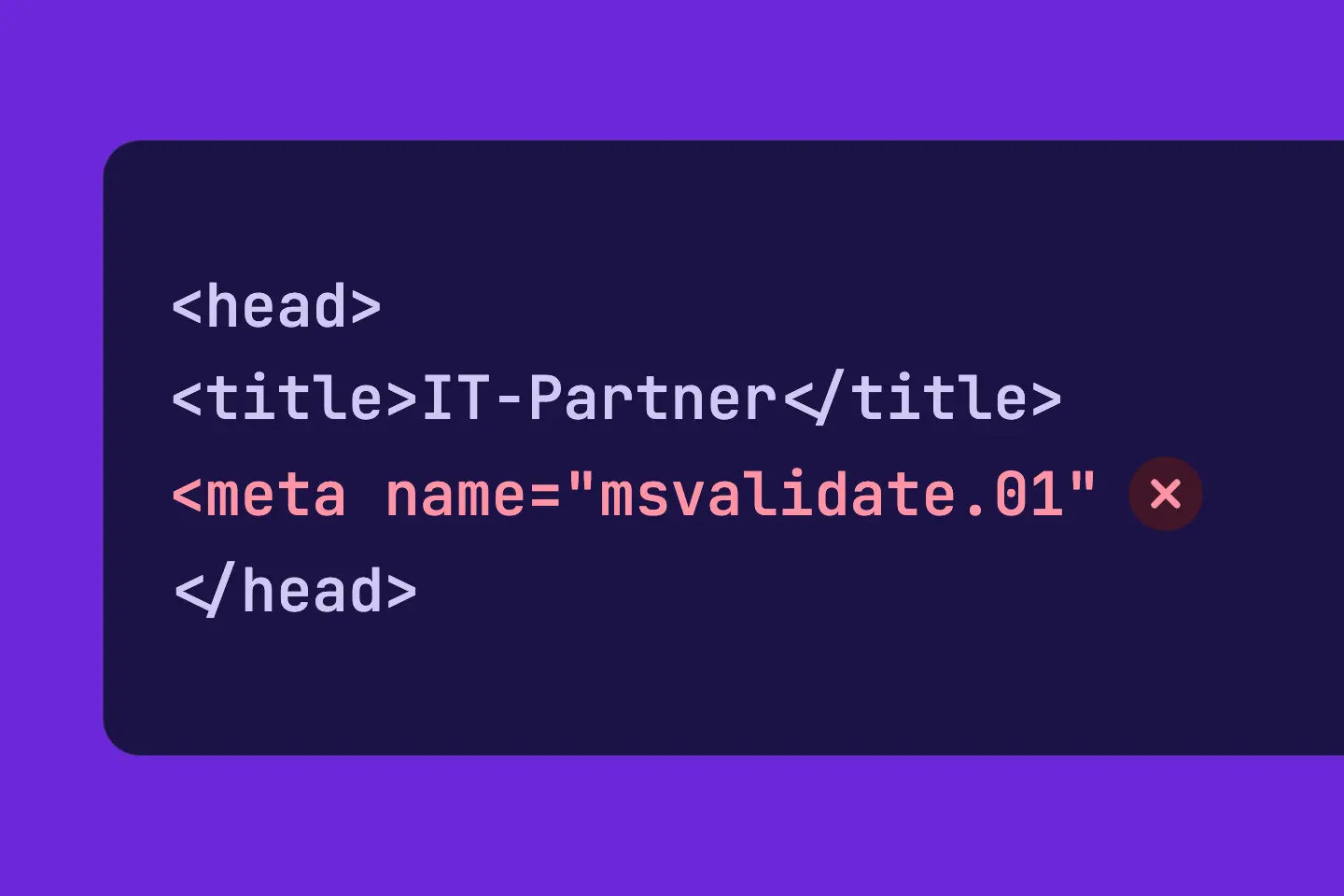
- The home page has no Bing meta tag
msvalidate.01. RankScan reads it from the<head>of the home page during the Crawling is the process by which a search engine bot fetches a URL and downloads its content. It is the first step before a page can be indexed.Open glossary entry →.
The measure concerns the whole website, not individual pages.
Why RankScan often cannot see the setup #
Bing offers several ways to verify a website. Only the meta tag is visible on the website. The Search Console import, the XML file and the DNS record leave no trace that RankScan reads during the crawl.
So: if you have already set up the website, mark the measure as done. It then counts as fixed right away, and RankScan does not reopen it. If you marked it by mistake, take the report back with «Not done after all».
If a later crawl finds the meta tag on the home page, RankScan also closes the measure without a report.
If your AI score rises to 50 or more, the trigger no longer applies. An open measure then closes with the status «No longer checked». If the score drops below 50 again and the meta tag is still missing, RankScan opens it again.
If your home address A redirect forwards users and search engines from one URL to another. It can be permanent (301) or temporary (302) and transfers signals to the target URL.Open glossary entry →, for example from / to /de/, RankScan does not check the measure. The same applies to crawls that cover only part of the website.
How to set up Bing Webmaster Tools #
Step 1: Verify your website #
Sign in at bing.com/webmasters.
- Import from Google Search Console: the fastest way. Bing takes over the verified websites from Search Console and treats them as verified. Sitemaps often come along too.
- Meta tag: Bing gives you a tag
<meta name="msvalidate.01" content="…">. It belongs in the<head>of the home page. Put it directly into the template, not through a tag manager. Bing often does not recognise a tag that a script inserts later. - XML file: you upload the file
BingSiteAuth.xmlto the root directory of the website. - DNS record: you add a CNAME record with your domain provider.
If you already use Search Console, take the import. If you need another way, the meta tag is the easiest to check, for RankScan too.
Step 2: Submit your XML sitemap #
Open the Sitemaps section and check whether the import already brought your sitemap over. If not, submit its address, usually /sitemap.xml.
What a clean sitemap looks like is covered in the article on the XML sitemap.
Step 3: Allow Bingbot #
Check your robots.txt: a rule Disallow: / for Bingbot or for all crawlers locks Bing out. Also check the firewall and bot protection of your hosting. Some services block unknown crawlers across the board.
More on crawler blocks in the article on AI crawlers and robots.txt.
Step 4: Set up IndexNow (optional) #
IndexNow is an open protocol. Your website uses it to report new, changed or deleted addresses directly to participating search engines, including Bing. Bing then does not have to discover the page at the next crawl.
How it works:
- You generate a key of letters and digits.
- You place a text file with the key as its name and content in the root directory.
- On every change, your website sends the affected addresses to the IndexNow endpoint.
Many content management systems and hosting providers offer an extension for this. Ask your developers or agency what fits your website. Google does not take part in IndexNow. For Google, the sitemap and crawling remain the way.
Step 5: Check after a few days #
Bing needs a few days before data appears. Then check:
- Index coverage: which pages does Bing know, which are missing?
- Crawl errors: does your website answer Bingbot with errors or redirect chains?
- URL inspection: how does Bing see a single important page?
- AI Performance: how often do Copilot and other Bing AI answers cite your pages, and for which queries?
Step 6: Mark the measure as done #
Mark the measure as done in RankScan.
How it is checked: the report closes the measure as fixed right away. On its own, RankScan only detects the setup through the meta tag on the home page, because the Search Console import leaves no trace. RankScan does not reopen a measure closed this way, even if the AI score stays low.
The «AI Performance» report #
Since February 2026, Bing Webmaster Tools have offered the «AI Performance» report as a public preview. Every verified website can use it without further setup.
It shows:
- how often Bing AI answers cite your pages, over time,
- which pages are cited,
- for which queries Bing draws on your content for an answer.
The report is a preview. Content and definitions may change. RankScan does not import it. It adds Microsoft's view to the AI Visibility in RankScan.
For local businesses: Bing Places #
If you have a location with walk-in customers or you work on site at your customers, an entry in Bing Places for Business is worthwhile. It is the counterpart to the Google Business Profile. Here too you can import an existing Google profile.
Bing Places is not part of this measure. RankScan has a separate measure for it: «Check your business listings in map services». More in the article on business listings in map services.
Common mistakes #
Mistake 1: Setting the meta tag through a tag manager #
Bing reads the meta tag in the delivered HyperText Markup Language (HTML) is the markup language for web pages. It defines the structure and content of a page, such as headings, paragraphs, links and images.Open glossary entry → of the home page. Bing often does not recognise a tag that a script inserts later. Put it into the template.
Mistake 2: Not checking the sitemap #
The Search Console import often brings sitemaps along, but not always. Look in the Sitemaps section.
Mistake 3: Blocking Bingbot in the firewall #
Strict bot protection can block Bingbot even though robots.txt allows it. The crawl errors in Bing Webmaster Tools show this.
Mistake 4: Expecting an immediate effect #
The setup makes your pages visible to Bing. Whether assistants mention them still depends on content, structure and trust. What helps there is covered in the article on Generative Engine Optimization.
Checklist: Bing Webmaster Tools #
- Website verified in Bing Webmaster Tools, ideally by importing from Search Console,
- XML sitemap submitted or brought over by the import,
- robots.txt and firewall allow Bingbot,
- IndexNow set up (optional),
- index coverage, crawl errors and «AI Performance» checked after a few days,
- measure marked as done in RankScan.
FAQ About Bing Webmaster Tools #
Do I need Bing Webmaster Tools if I use Google Search Console?
Yes, if Copilot matters to you. It is worth it for ChatGPT too, because OpenAI names Microsoft as a search partner. Search Console only shows the Google index. What Bing knows about your website you only see in Bing Webmaster Tools.
How long does the setup take?
With the Search Console import, usually a few minutes. It takes a few days until Bing shows data.
Why does RankScan show the measure although I have already set up Bing?
RankScan only detects the setup through the meta tag on the home page. The Search Console import leaves no trace. Mark the measure as done and it counts as fixed.
Does IndexNow bring better rankings?
No. IndexNow speeds up how quickly Bing learns about new and changed pages. It does not decide rankings.
Does the setup raise my AI Visibility?
That is not proven. The setup makes sure Bing knows your pages and shows you errors. Many factors move the AI score. A change does not prove an effect of the setup.
Conclusion: let Bing know what you have #
Setting up Bing Webmaster Tools takes little time. It gives you the only view into the Bing index. Copilot uses it, and according to OpenAI, ChatGPT search works with Microsoft as a search partner. The setup is no guarantee of more AI mentions. Without it, though, you do not know whether Bing knows your most important pages at all.
Sources and further reading #
- Source: Bing Webmaster Blog: Import sites from Search Console to Bing Webmaster Tools
- Source: Koozai: Bing Webmaster Tools Launches AI Performance Reporting
- Source: Locomotive: AI Performance in Bing Webmaster Tools
- Source: OpenAI Help: Searching the web with ChatGPT, information shared with search providers
- Source: Tenten: Bing Webmaster Tools and ChatGPT visibility
- Counterpoint: Practical Ecommerce: Google's index now powers ChatGPT
- Source: Yandex Webmaster: IndexNow key for user verification