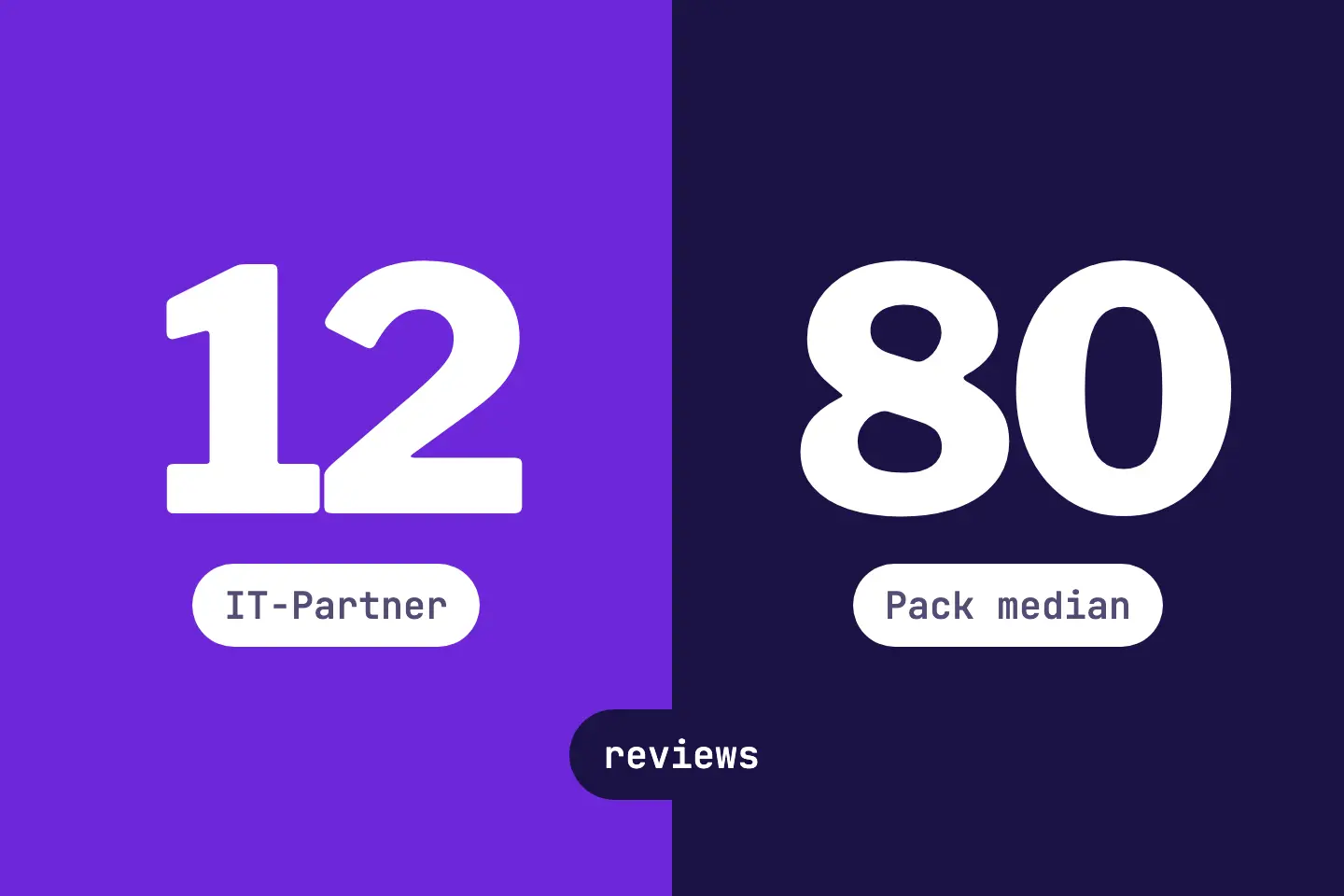
When someone searches for a local offer, Google often shows a map block with three businesses. This block is called the local pack. Each listing shows its stars and its number of reviews.
In RankScan, the matching measure is called «Collect reviews on your Google profile». It appears when your business has clearly fewer reviews in the local pack than the competitors in the same block. Or when it has fewer than 20 reviews.
The measure suggests a simple routine: ask your customers for an honest review on your Google profile after every job.
AI Overviews are AI-generated answer boxes from Google that appear above the classic search results. They summarize information from the web and can change click distribution.Open glossary entry →, AI Mode and ChatGPT often cite the Google Business Profile for local queries. Your reviews appear there. That more reviews raise your mentions in AI answers is not proven.
- The RankScan measure «Collect reviews on your Google profile» only appears if your business shows up in at least one local pack for your tracked A keyword is the search term users enter into a search engine to find information, products or providers. Keywords are the basis against which rankings and visibility are measured.Open glossary entry →.
- Classification in RankScan: severity medium · effort medium · work type editorial. Area Search visibility describes how present and findable a website is in the organic search results. It is not the same as traffic, but reflects theoretical findability.Open glossary entry →.
- Trigger: your weakest location has less than half the median of the competitors in the same pack, or fewer than 20 reviews.
- The 20 is a setting chosen by RankScan, not an industry benchmark.
- The measure names your stars, but stars do not trigger it.
- Ask all customers the same way for a review, using the link or QR code from your Google profile.
- According to Google, incentives such as discounts, bought reviews and reviews with a conflict of interest, for example from employees or relatives, are prohibited.
- Reply to reviews, including critical ones.
- How it is checked: RankScan reads the reviews from the local pack on every search run. Once the target is reached, RankScan reports «Fixed».
Why reviews on your Google profile matter #
For local Google Search #
Google names three main factors for local ranking: relevance, distance and prominence. On prominence, Google writes: more reviews and positive ratings can help your business's local ranking.
Reviews also help people choose. According to Google, honest and balanced reviews can help potential customers decide.
For AI search #
In August 2026, BrightLocal studied which sources AI search cites for local queries. It covered Google AI Overviews, Google AI Mode and ChatGPT. The Google Business Profile accounted for 28.6 % of citations, more than any other source. The study ran 60,970 checks for locations in the US, the UK and Australia.
This only shows one thing: the profile that carries your reviews is a frequent source. The study proves nothing for Switzerland or for B2B providers. Whether more reviews raise your mentions in AI answers is not proven. The study makes no statement on this.
According to Google's help, Gemini uses public information from Google Maps and also gives the ratings of a place. More on this in the article on business listings in map services.
What does «Collect reviews on your Google profile» mean? #
Classification in RankScan: severity medium · effort medium · work type editorial. The measure belongs to the area Search Visibility and concerns the whole property, not individual pages.
Where the numbers come from #
RankScan measures the Google rankings of your tracked keywords. When a The Search Engine Results Page (SERP) is the page a search engine returns after a query. Besides the organic listings it often contains extra elements such as ads, featured snippets or AI Overviews.Open glossary entry → shows a local pack, RankScan reads the stars and the review count there. This applies to your own business and to the other listings in the pack.
For each results page, RankScan forms the median of the review count of the other listings. The median is the middle value: half of the competitors have more reviews, the other half fewer. Across all keywords of the run, the middle of these values counts. For your business, the highest review count any pack shows counts. If your listing shows no review count, it does not count for that run.
When the measure appears #
The measure appears when one of two conditions applies:
- Your weakest location has less than half the median of the competitors in the same pack.
- Your weakest location has fewer than 20 reviews.
If the competitors in the pack show no review count, only the limit of 20 applies. RankScan set this 20. It is not a proven industry value, but a floor for the comparison.
When the measure counts as fixed #
An open measure only closes at 60 % of the median and at least 20 reviews. So the limit for closing is higher than the limit for opening. This keeps the measure from flipping open and closed when your count sits just at the limit. If the competitors show no review count, it closes at 20 reviews.
An example: the competitors have a median of 80 reviews. The measure opens below 40 reviews. It closes at 48 reviews. RankScan shows you the target in the check sentence of the measure.
Several locations #
If you have several locations, the measure names the weakest one. The other locations are listed with their review count.
Stars do not trigger anything #
The measure names your average star rating. It is triggered only by the number of reviews.
What RankScan cannot see #
RankScan only measures if your business shows up in at least one local pack. If it is missing there, no measure appears. RankScan then also does not say whether you lack a Google profile. Google may simply show other businesses for your keywords.
In that case, check your profile yourself. More in the article on business listings in map services.
How to collect reviews on your Google profile #
Step 1: Copy the review link #
Open your Google Business Profile at business.google.com. Select «Read reviews» and then «Get more reviews». There you copy the link with «Copy».
You download the QR code in the same place: right-click the code, then «Save image as...». According to Google, this only works in a browser on a computer, not on a phone.
To reply to reviews, your profile must be verified. Customers need a Google Account to write a review.
Step 2: Decide when you ask #
Set a fixed moment, for example after finishing a job or after a visit. A fixed moment makes sure you ask regularly and do not forget.
Step 3: Send the link and print the QR code #
Send the link by email or message. Google names thank-you emails, the end of a chat, email and WhatsApp for this.
Print the QR code on invoices, delivery notes or table cards. Google suggests receipts and a printed QR code in your store.
Do not put anyone under pressure. According to Google, merchants must not require or pressure users to leave reviews while on the premises. They must not ask for specific content either.
Step 4: Ask everyone the same way #
Ask all customers the same way, not only the happiest ones. Google explicitly prohibits selectively soliciting positive reviews or discouraging negative ones.
If you first ask about satisfaction and only send happy customers to Google, in our reading you are also selectively soliciting positive reviews. Google does not name this method explicitly.
Step 5: No incentives, no bought reviews #
Offer nothing in return, such as a discount, a gift or a free service. Never buy reviews. Google counts both as fake engagement and prohibits them.
This also applies if you offer something in return for changing or removing a negative review.
Step 6: No reviews from employees or relatives #
Do not let employees or relatives write reviews. Google prohibits content based on a conflict of interest. As examples, Google names current or former employment, family relationships and competitors.
Do not give your team a target number of reviews either. The policies prohibit that too.
Step 7: Reply to reviews #
Reply to every review, including critical ones: factual, friendly and timely. According to Google, a reply shows that you value the feedback.
Google gives a few tips:
- Keep the reply short and clear.
- Do not use the reply for promotions or discounts.
- Never share the reviewer's private information and do not attack them.
- Apologise where appropriate and address the specific feedback.
Step 8: Collect steadily and wait for the check #
Collect reviews steadily, not in one short burst. Google counts unusual volumes or patterns of reviews as rating manipulation.
Mark the measure as done. It counts as fixed only once the next measurement shows the target.
How it is checked: RankScan reads the reviews from the local pack on every search run. As soon as your weakest location reaches the target, RankScan reports «Fixed». The target is the larger of two values: 60 % of the competitors' median or 20 reviews.
If your business is in no local pack during a run, RankScan does not measure. An open measure then stays open.
Common mistakes #
Mistake 1: Asking only the happiest customers #
It seems obvious, but it breaks Google's policies. Ask everyone the same way.
Mistake 2: Offering a small reward #
Even a small discount is an incentive. Google prohibits incentives such as payment, discounts, free goods or services for a review.
Mistake 3: Asking your team for reviews #
Employees, former employees and relatives have a conflict of interest. Their reviews break the policies.
Mistake 4: Everything in one week #
A burst of many reviews in a short time can look like an unusual pattern to Google. Ask after every job instead.
Mistake 5: Leaving criticism unanswered #
A factual reply to criticism shows future customers how you deal with problems.
Checklist: reviews on your Google profile #
- review link copied from the Google profile, QR code downloaded on a computer,
- fixed moment for asking set, for example after the job,
- link sent by email or message, QR code on invoice, delivery note or table card,
- all customers asked the same way, without pressure on the premises,
- no incentives, no bought reviews,
- no reviews from employees or relatives,
- every review answered, including critical ones,
- measure marked as done, next search run awaited: «Fixed» once the target is reached.
FAQ About reviews on your Google profile #
Why does RankScan not show the measure although I have few reviews?
RankScan only measures if your business shows up in at least one local pack for your tracked keywords. If it is missing there, no measure appears. RankScan then does not say whether you lack a Google profile.
Where does the limit of 20 reviews come from?
RankScan set it. It is not a proven industry value. It applies on its own when the competitors in the pack show no review count.
Do my stars count?
The measure names your average star rating. It opens and closes only on the number of reviews.
Am I allowed to ask for reviews at all?
Yes. Google allows you to ask for reviews that reflect a genuine experience. Incentives, asking only for positive reviews and pressure are prohibited.
I have several locations. Which one counts?
The weakest location counts. The measure names it, and the other locations are listed with their review count.
Do more reviews raise my mentions in AI answers?
That is not proven. What is proven: AI search often cites the Google profile for local queries, and that is where the reviews appear. For local Google Search, Google writes that more reviews and positive ratings can help your local ranking.
When does the measure close?
On a search run in which your weakest location has at least 60 % of the competitors' median and at least 20 reviews. You can mark the measure as done at any time; what counts is the next measurement.
Conclusion: asking is part of finishing the job #
Reviews rarely come on their own. If you ask after every job, treat everyone the same and reply to every review, you collect them steadily and within the rules. That helps people choose and, according to Google, your local ranking. Whether they raise your mentions in AI answers is not proven.
Sources and further reading #
- Source: Google Business Profile Help: Create a Google link or QR code to request reviews
- Source: Google Business Profile Help: Tips to get more reviews
- Source: Google Business Profile Help: Manage customer reviews
- Source: Google Business Profile Help: Tips to improve your local ranking on Google
- Source: Maps user-generated content policy: Prohibited & restricted content (Fake engagement, Rating manipulation)
- Source: BrightLocal: AI Directory Sources (26.08.2026, US, UK, Australia)
- Source: Gemini Apps Help: Find places & get directions in Gemini Apps