Prospects come to your website with questions. How much does it cost? How long does it take? Is the offer right for me? Many pages answer these questions somewhere in the text. But they do not ask the question visibly, and the answer is not where people look for it.
Search engines and AI assistants read a page in sections. A subheading phrased as a question with a short answer below it is a clear section for them: question, answer, then details. A A featured snippet is a highlighted answer excerpt that Google displays above the classic results. It answers a query directly and is often called position zero.Open glossary entry → in Google often comes from exactly such sections. There is no guarantee of this.
This article explains two RankScan measures in the Website Health category: “No clear Q&A structure” and “Question headings without a direct answer”. Both are editorial tasks in the visible text. Neither requires markup.
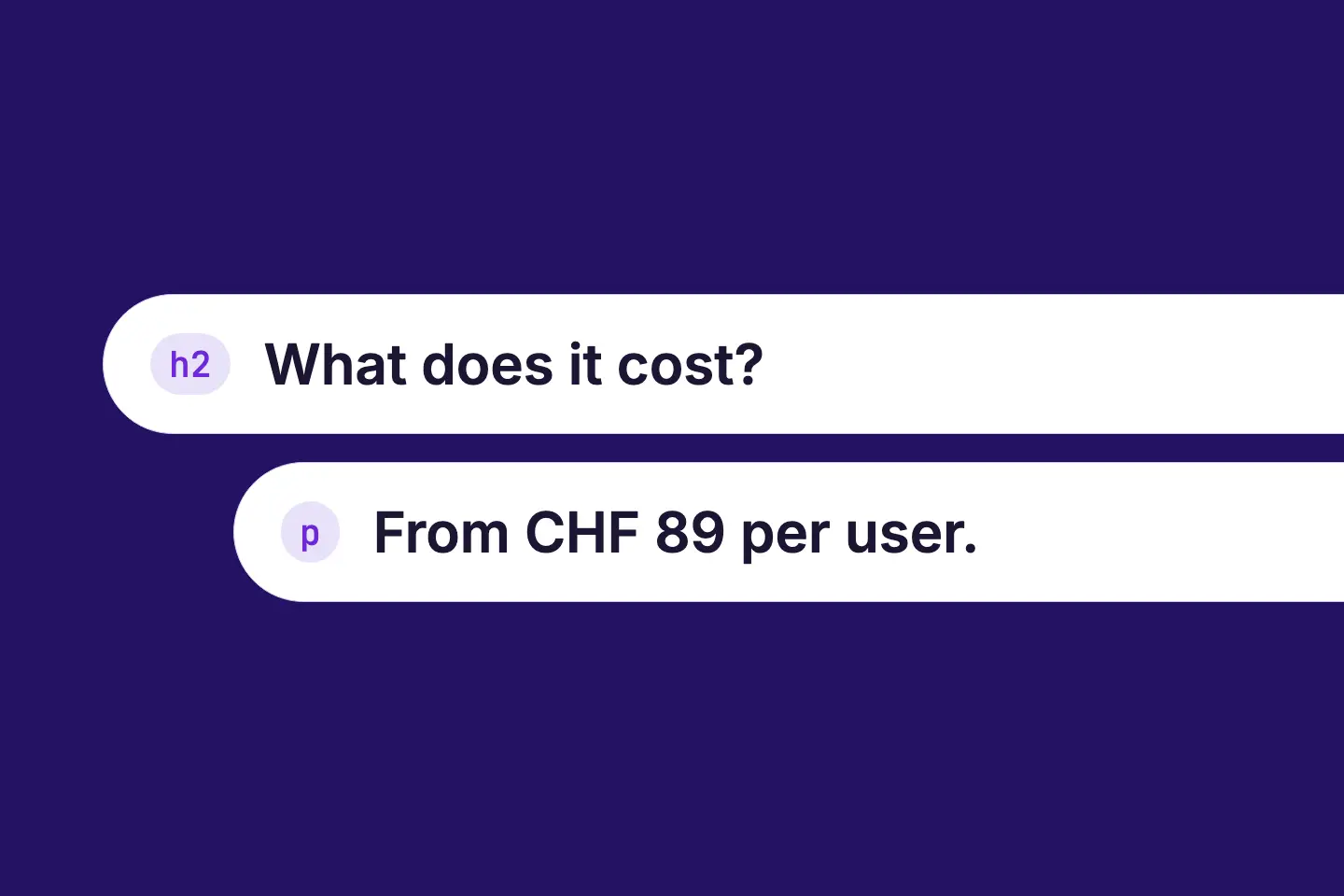
A good question heading is a question that prospects really ask. A good answer answers it in the first one or two sentences.
- “No clear Q&A structure” means: the page has subheadings, but no question heading is followed by content.
- “Question headings without a direct answer” means: the page has question headings, but some of them have no short answer below.
- For RankScan, a question heading is an H2 or H3 subheading that ends with a question mark. Bold text does not count.
- Rating in RankScan: “No clear Q&A structure” has medium severity · medium effort · work type Editorial. “Question headings without a direct answer” has low severity · low effort · work type Editorial.
- Both measures list a batch of up to five pages. No page is in both batches.
- The home page only goes into the batch of “Question headings without a direct answer”.
- Neither measure requires markup. FAQPage schema labels visible questions and answers on a page in a structured way. It may only be used when the FAQ content is actually visible on the page.Open glossary entry → is optional.
- After the work is done, you mark the measure as done. The next full Crawling is the process by which a search engine bot fetches a URL and downloads its content. It is the first step before a page can be indexed.Open glossary entry → checks the pages of the batch.
Why a Question Needs a Direct Answer #
A question as a subheading with the answer directly below it makes a section unambiguous. Readers find the answer while skimming. Machines can take over the section as a question and an answer.
Featured A snippet is the compact display of a result in the search results, usually made up of a title, URL and description. It is what users see before clicking.Open glossary entry →: Google describes featured snippets as special boxes in which an excerpt of a page appears before the link. They also appear in the group of People Also Ask (PAA) is a Google SERP element that shows related questions with expandable answers. It helps users explore a topic further and can affect clicks.Open glossary entry → that many know as “People also ask”. Google decides automatically whether a page makes a good featured snippet. There is no markup for this.
Source: Google Search Central, Featured Snippets and Your Website
AI answers: For AI Overviews are AI-generated answer boxes from Google that appear above the classic search results. They summarize information from the web and can change click distribution.Open glossary entry → and AI Mode, Google names no additional requirements and no special markup. The usual Search Engine Optimization (SEO) covers all measures that help a website become more visible in unpaid (organic) search results.Open glossary entry → fundamentals apply, such as making important content available as text.
Source: Google Search Central, AI Features and Your Website
RankScan explains both measures like this: AI answers and featured snippets are most likely to take a question as a heading with the direct answer below it. AI assistants often cut answers directly from below the question. A reference or an image gives them nothing there.
This is not a ranking promise. A clear question with a direct answer increases the chance that a machine finds and uses your answer. The article on Generative Engine Optimization explains more about visibility in AI answers.
What RankScan Recognizes as a Question Heading #
During the crawl, RankScan reads the subheadings of every page. A question heading is an H2 or H3 subheading whose text ends with a question mark.
This applies to both measures:
- Only real headings: Bold text that looks like a title is not a heading. Choose the H2 or H3 format in the editor.
For “Question headings without a direct answer”, these rules also apply:
- Only the content counts: Questions in the menu, the header, the footer or a sidebar do not count.
- No teasers: A question heading inside a link, for example on a teaser card, does not count.
The article on SEO headings explains how the two levels H2 and H3 work together.
What Does “No clear Q&A structure” Mean? #
The RankScan measure “No clear Q&A structure” means: the listed pages rank or are linked, but answer no question explicitly as a question with an answer. Specifically, the page has H2 or H3 subheadings, but no question heading is followed by content. Content here means text, a list, a table or even an image or video. If the page has no question heading at all, the finding applies too.
Rating in RankScan: medium severity · medium effort · work type Editorial.
Which Pages Go into the Batch #
- Batch: RankScan lists up to five pages. The counter in the title covers all affected pages.
- Relevant pages: The batch contains pages that rank, are linked in AI answers or belong to a topic. The most important come first.
- Without the home page: The home page never goes into the batch.
- Fallback: If no page has rankings, AI citations or a topic yet, RankScan lists up to five pages closest to the home page. The home page is left out here too.
- Excluded: Legal, confirmation and function pages, contact and location pages and product pages do not count. Category pages do count.
Procedure #
- Work through the list from top to bottom. The most important pages come first. In the fallback, you start with the first page, which is closest to the home page.
- Skip pages that no question fits, for example gallery, contact or registration.
- For each such page, choose “Skip” under “Affected pages”. From the next scan on, it no longer counts.
- If the title of an article is already a question, answer it in the first paragraph. Add a follow-up question as a subheading.
- Collect two to five real questions or objections from prospects for each remaining page.
- Write each question as an H2 or H3 subheading.
- Answer the question directly in the first two sentences below it, then add details.
- For each question, choose the heading format H2 or H3 in the editor, not bold text.
- Publish the pages and mark the measure as done.
How RankScan checks it: The next full crawl after your report checks the pages of the batch. RankScan reports “Fixed” when none of these pages still carries the finding. Otherwise RankScan reports “Not fixed yet” and shows how many pages of the list are done. Each page then shows “Done”, “Still affected” or “No longer found”. A page the crawl no longer finds does not count.
Watch the answer in step 7. If a reference, an image or a long first sentence follows a question heading, the page no longer carries this finding. It can then show up in “Question headings without a direct answer”, though.
What Does “Question headings without a direct answer” Mean? #
The RankScan measure “Question headings without a direct answer” means: some question headings have no short answer below them. Instead, an image, a reference or a very long first sentence follows.
Rating in RankScan: low severity · low effort · work type Editorial.
When an Answer Is Missing #
RankScan reads what follows the question up to the next heading. There are three findings:
- No text below: Nothing follows the question, or only an image, a video or a form.
- Starts with a reference: The first sentence starts with a phrase like “In this article”, “In the following”, “As described above”, “Good question” or “Before we”. RankScan also recognizes the German equivalents.
- First sentence too long: The first sentence has more than 40 words.
A list or table directly below the question counts as an answer.
Which Pages Go into the Batch #
- Batch: RankScan lists up to five pages that rank, are linked in AI answers or belong to a topic.
- With the home page: The home page is allowed.
- No fallback: Without a relevant page, no measure is created.
- Excluded: Legal pages, confirmation pages like “Thank you” and function pages like a gallery or registration do not count.
What RankScan Shows per Page #
Below each page in the list, up to three affected questions are shown. For each question, RankScan names the finding: “no text below”, “starts with a reference” or “first sentence with” the number of its words. This way you know which spot to change without searching.
Procedure #
- Open the pages in the list. The affected questions are listed below each page.
- Write an answer of one to two short sentences directly below the question.
- Leave out introductions like “In this article” and start with the answer.
- Images, tables and details follow after these sentences.
- Publish the pages and mark the measure as done.
How RankScan checks it: The next full crawl after your report checks the pages of the batch. RankScan reports “Fixed” when none of these pages still carries the finding. Otherwise RankScan reports “Not fixed yet” and shows how many pages of the list are done. Each page then shows “Done”, “Still affected” or “No longer found”.
Which Page Is in Which Measure? #
Each page is in at most one of the two measures. The distinction is simple: is at least one question heading already followed by content?
| Situation on the page | Measure |
|---|---|
| Subheadings present, but no question heading is followed by content | “No clear Q&A structure” |
| Question headings with content below, but some lack a short answer, for example because only an image follows | “Question headings without a direct answer” |
| Question headings with a short answer | none |
So the first measure asks: do you ask questions at all? The second asks: do you answer them right away?
How to Write a Direct Answer #
A direct answer starts with the result. Reasons, conditions and examples follow after it.
The following patterns are general editorial know-how. Of these, RankScan only measures whether an answer is present, how it starts and how long its first sentence is.
| Question type | First sentence starts with | Example |
|---|---|---|
| What is …? | the definition | “A timber-frame element house is a house built from prefabricated wall and floor elements.” |
| How long …? | the duration | “On-site assembly usually takes a few days.” |
| How much does … cost? | the price or what it depends on | “The price depends on floor area, fit-out and plot.” |
| Yes/no question | yes or no | “Yes, you can also book the consultation online.” |
| How do I …? | the first step or a list | a numbered list with the steps |
The examples are made up and only show the structure. Use your own details.
Bad and Good Compared #
Bad:
## How long does it take to build a timber house?
In this article, we show you which phases a building project goes through
and what you should consider when planning.
The first sentence is a reference. RankScan reports “starts with a reference”.
Good:
## How long does it take to build a timber house?
From the building permit, expect a few months until you move in.
On-site assembly takes only a few days of that.The duration depends on three phases: ...
The answer is in the first sentence. The details follow after it.
Rules of Thumb #
- Start with the answer, not with the question in other words.
- Keep the first sentence short. RankScan reports a first sentence of more than 40 words.
- Put images, videos and references after the answer, never before it.
- Name concrete details when you can back them up. The article on high-quality content and fact density explains more.
- One question per section. Several questions in one heading make the answer unclear.
Where the Right Questions Come From #
The steps ask for real questions or objections from prospects. Invented questions like “Why are we the best?” help nobody.
Good sources are:
- Sales and consulting: Which questions do they hear in every first meeting?
- Customer service: Which questions keep coming in by email and phone?
- Google Google Search Console (GSC) is a free Google tool that shows how a website performs in organic search, with data on impressions, clicks, click-through rate and average position, plus indexing and technical issues.Open glossary entry →: Which search queries phrased as questions already lead to the page?
- Search results: Which questions does Google show for your topic in the group of related questions?
- Objections: What keeps prospects from buying or sending an inquiry?
Choose two to five questions per page that fit the topic of the page. A service page answers questions about the service. A guide answers questions about the problem.
FAQPage Markup: Optional, Not Required #
Neither measure requires FAQPage markup. What matters is the question as a subheading and the direct answer below it.
Since August 2023, Google shows FAQ Rich results are enhanced displays in Google, for example with ratings, prices or breadcrumbs, which can be enabled by suitable structured data.Open glossary entry → almost only for well-known, authoritative government and health websites.
Source: Google Search Central Blog, Changes to HowTo and FAQ rich results
If you use FAQPage markup anyway, it must reflect the visible content. Google requires Schema markup is code that describes a page's content in a structured way, so search engines understand it not just as text but as clearly classified information.Open glossary entry → to represent the visible content of the page.
Source: Google Search Central, General Structured Data Guidelines
The article on Schema Markup shows what FAQPage markup looks like.
Common Mistakes #
Mistake 1: Setting the Question as Bold Text #
Bold text looks like a title, but it is not one. RankScan only recognizes H2 and H3 subheadings. Change the format to heading in the editor.
Mistake 2: Starting with a Reference #
Sentences like “In the following, we explain …” push the answer back. Delete them and start with the answer.
Mistake 3: Placing an Image Directly Below the Question #
An image below the question is not an answer. Write one to two sentences first, then add the image.
Mistake 4: Overloading the First Sentence #
A sentence with many clauses contains the answer, but hides it. Split it into two short sentences.
Mistake 5: Turning Every Heading into a Question #
Not every section is a question. A subheading like “Our references” stays a subheading. Only ask where prospects really ask.
Mistake 6: Putting Questions into an Accordion Without a Heading #
Some templates show FAQs as an expandable list without H2 or H3. Check which format your template outputs for the question. If the heading is missing, have the template adjusted.
Example: Service Page of a Timber Builder #
The example is made up and shows the process.
Initial Situation #
A timber builder has a service page “Timber-frame element construction”. It ranks for a few search queries. RankScan lists it in the batch of “No clear Q&A structure”. The page has subheadings like “Our services” and “Process”, but no question.
Analysis #
- Sales hears three questions again and again in first meetings: duration, cost, energy standard.
- The answers are scattered across the body text.
- A section “Process” starts with a large image.
Solution #
- Add three questions as H2: “How long does a timber-frame element house take?”, “How much does a timber-frame element house cost?”, “Which energy standard does a timber-frame element house reach?”.
- Write an answer of one to two sentences below each question.
- Move the image in the “Process” section after the first sentence.
- Publish the page and mark the measure as done.
Result #
The next full crawl finds question headings with a short answer. The page no longer carries the finding. Whether Google or an AI assistant uses the answers is up to these systems.
Checklist: Questions with a Direct Answer #
The first two points are a precondition: only then does RankScan recognize a question heading. RankScan measures the third and fourth points. The rest is a general editorial checklist.
- Is every question an H2 or H3 subheading, not bold text?
- Does every question heading end with a question mark?
- Is there text, a list or a table directly below every question?
- Does the answer start without a reference, and does its first sentence have at most 40 words?
- Are the questions real questions from prospects?
- Does every question fit the topic of the page?
- Does the first sentence answer the whole question, not only part of it?
- Do images and details only follow after the answer?
- If you use FAQPage markup: do markup and visible text match?
- Have you marked the measure as done?
In addition, summaries and key takeaways, semantic HTML, mentions in AI answers and striking distance keywords help you build pages more clearly for search and AI.
FAQ About Question Headings and Direct Answers #
What is a featured snippet?
A featured snippet is a highlighted result in which Google shows an excerpt of your page before the link. Google selects the excerpt automatically.
Can I force a featured snippet?
No. There is no markup for featured snippets. A question as a subheading with a direct answer does make a section easier to use, though.
What is a question heading for RankScan?
A question heading is an H2 or H3 subheading that ends with a question mark. Bold text does not count. For “Question headings without a direct answer”, questions in the menu or footer do not count either.
How long may the answer be?
The answer should fit into one or two short sentences. RankScan reports a first sentence of more than 40 words as too long.
Does a list count as an answer?
Yes. A list or table directly below the question counts as an answer.
Why is my home page not in “No clear Q&A structure”?
The home page never goes into the batch of this measure. For “Question headings without a direct answer”, however, it is allowed.
Can a page be in both measures?
No. “No clear Q&A structure” covers pages without a question heading followed by content, including pages without any question. “Question headings without a direct answer” only covers pages where at least one question heading is followed by content.
Do I need FAQPage markup?
No. Neither measure requires markup. FAQPage markup is optional and must reflect the visible content.
When does RankScan check my changes?
The next full crawl after your report checks the pages of the batch. RankScan then reports “Fixed” or “Not fixed yet”.
Conclusion: Answer First, Details Second #
Questions as subheadings and answers in the first sentences make a page clearer for readers, search engines and AI assistants. RankScan checks two things for this.
“No clear Q&A structure” shows important pages that ask no question. “Question headings without a direct answer” shows pages that ask questions but do not answer them right away.
The process is the same for both:
- collect real questions from prospects,
- set each question as an H2 or H3 subheading,
- write the answer into the first one or two sentences,
- add images and details after that,
- publish and mark the measure as done.
The next full crawl then checks the pages of the batch.